Owners and managers told when it matters, where they are

Notifications & alerts

Notify owners, managers and teams through the in-app inbox and by email: statements, payments, reminders, tasks, compliance and announcements.

https://domera.cy/dashboard/notifications
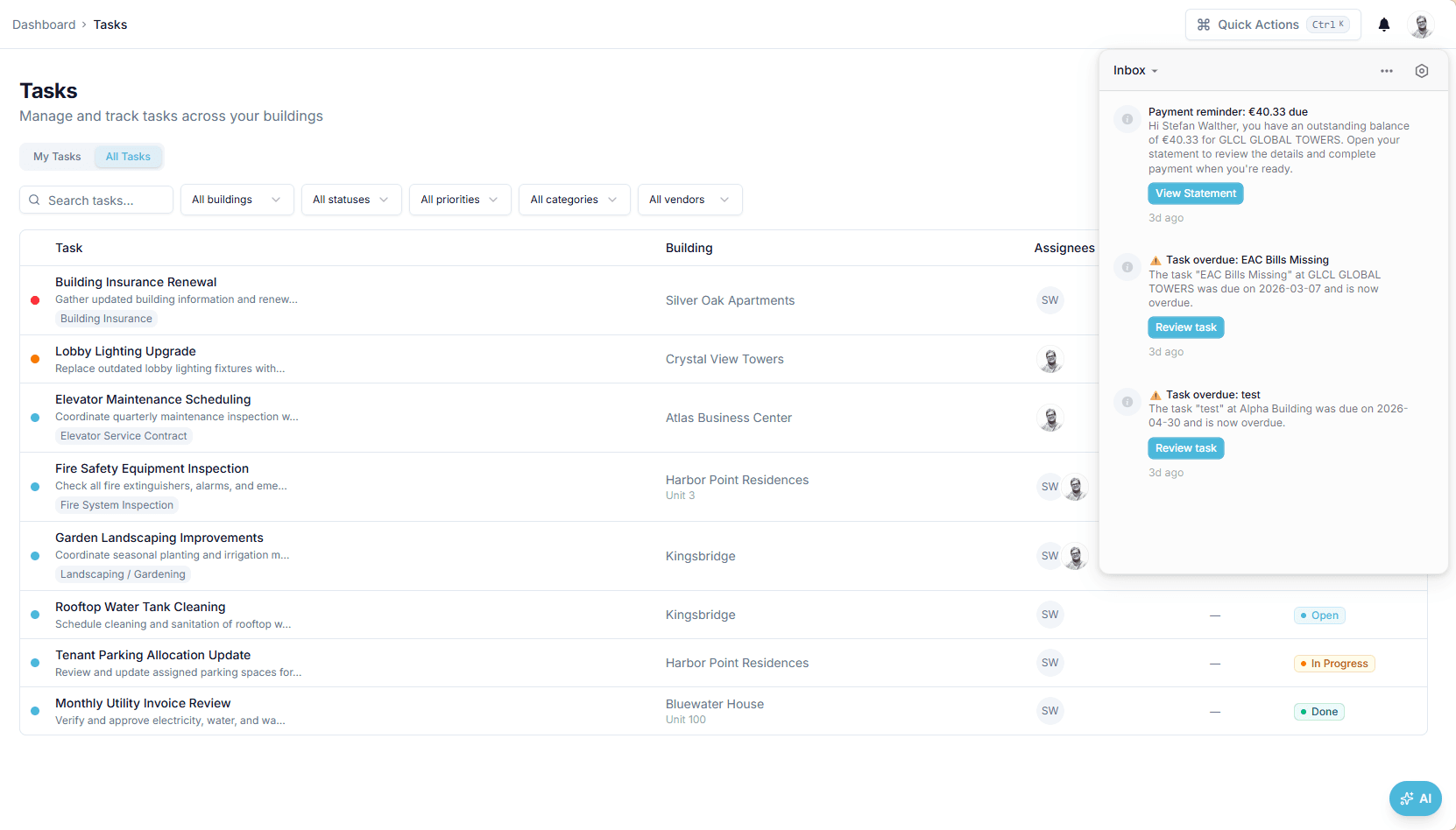
In-app inbox open over the tasks list, showing a payment reminder for €40.33 with a 'view statement' button and two overdue task alerts with 'review task' buttons

Interface shown is from an earlier version

Outcome

A payment reminder states the amount due and the statement it comes from, so the reminder and the owner's portal show the same figure.

In practice

Why teams use this feature

What managers and committees tell us it changes in the monthly routine.

  • In-app inbox in dashboard and owner portal, plus email

  • Weekly payment reminders naming the amount due; daily task and compliance reminders

  • Summary emails for owners who have not signed up

  • Inbox in the dashboard and in the owner portal

  • Email for owners who have not set up a portal account

  • Scheduled payment reminders, task alerts and compliance due dates

  • Announcements per building, limited to the buildings the sender manages

How it works

What this feature does

Statements finalised, payments recorded, maintenance updates, task assignments and comments, announcements, compliance due dates and payment reminders arrive as in-app notifications in the dashboard and the owner portal and as email, through Novu. Owners without an account receive a summary email with the figures and an invitation. Scheduled jobs send payment reminders on Mondays at 08:00 and task reminders daily at 07:00.

01

Which events send a notification?

Statement finalised (period and amount due). Payment recorded (amount and unit). Maintenance request updated. Task assigned, claimed, commented, changed status, overdue. Announcement published. Compliance item due. Payment reminder. Smart alert triggered by a rule you set. Each has a Novu workflow; each names the building and links to the screen where the item lives.

02

How does a reminder read?

'Payment reminder: €40.33 due. You have an outstanding balance of €40.33 for GLCL Global Towers. Open your statement to review the details.' The figure is the amount billed on the latest finalised statement less payments received against it; owners with no balance receive nothing. Reminders run on Mondays at 08:00; the email states the amount and links to the portal — documents are never attached.

03

What about owners who never signed up?

They still receive email. When a statement is finalised or a payment is recorded for their unit, a summary email states unit, period, amount and balance, and links to the portal to create an account. An owner listed twice on a unit is mailed once. Nothing is attached, so a forwarded email reveals no document. Once they sign up, the same events appear in their in-app inbox.

04

Who controls the volume?

Events are automatic; announcements are yours. The announcement wizard picks buildings — all sixteen or a few — then the message, then a review; owners of those buildings are notified in-app and by email. Reminders — personal or smart — add rules: no expense this month, balance above €500.00, budget exceeded, contract expiring. Each rule can be paused. The in-app inbox keeps the history.

In the product

See it on the screen

https://domera.cy/dashboard/announcements

Interface shown is from an earlier version

Announcing to buildings

New announcement dialog, step 1 of 3, choosing the buildings to send to — 'all buildings' or a searchable list

Related

Keep exploring

  • AI building assistant

    Ask about any building, owner or balance in plain language; the Domera assistant answers from your company's own records.

    Learn more
  • Smart allocation engine

    Allocate every common expense by ownership share, floor area, equal parts, floor level, lift share or a custom rule.

    Learn more
  • Owner portal transparency

    Owners sign in and read their own units' statements, balances, payments, documents, compliance status and meetings.

    Learn more

FAQ

Frequently asked questions

More answers on the full FAQ page.

What types of events trigger notifications?
Statements finalised, payments recorded, maintenance updates, task assignments, claims, comments and status changes, overdue tasks, announcements, compliance due dates, weekly payment reminders and smart alerts from your own rules.
Do owners need to create an account to receive notifications?
Registered owners receive in-app and email notifications. Owners without an account receive a summary email with the figures and a link to create one; documents are never attached.
Can managers control which notifications are sent?
Event notifications are automatic. Announcements are sent only when a manager publishes one, to the buildings chosen. Smart alert and personal reminder rules are created, paused and archived by the team.

Start with one building

Ready to put the building's books in order?

Start the 14-day trial, add the first building and run one month through it. Import the owners, post the invoices, issue the statements.

  • 14-day free trial
  • No credit card required
  • Cancel any time