Invoice your buildings; read the revenue by month

Internal invoicing & revenue tracking

Issue sequentially numbered invoices for the services your company provides, and follow revenue by building and service line.

https://domera.cy/dashboard/vendors
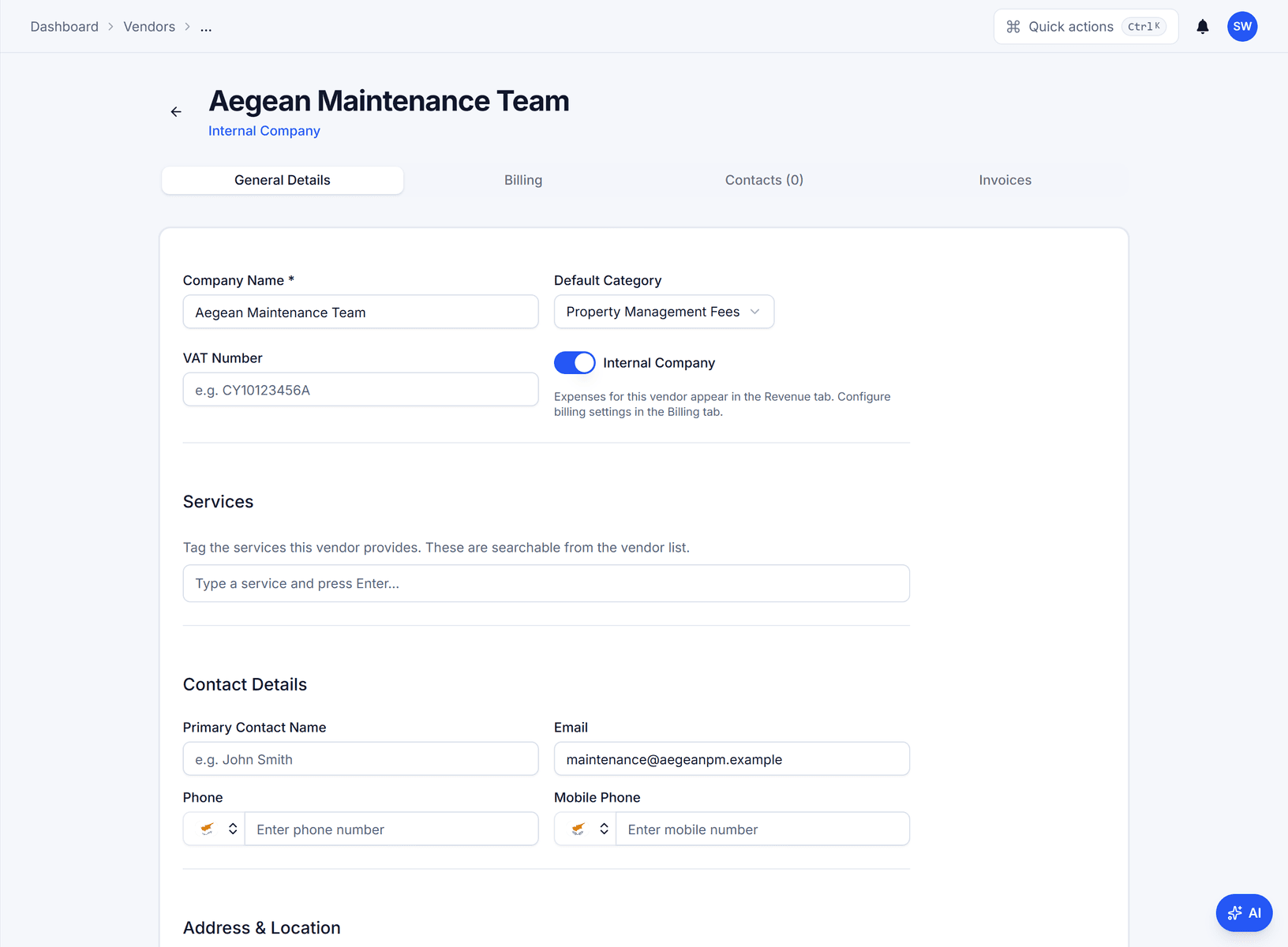
Vendor page for 'Aegean Maintenance Team' with the 'internal company' switch on, default category, VAT number, services and contact fields, and Billing and Invoices tabs

Outcome

Numbers come from a per-template prefix and six-digit counter, VAT is recorded on every invoice, and the PDF is filed with the building's documents.

In practice

Why teams use this feature

What managers and committees tell us it changes in the monthly routine.

  • Sequential invoice numbers with your prefix, taken one at a time

  • Invoice PDF with VAT and bank details, attached to the expense

  • Revenue by vendor, building, city and month; CSV export

  • Sequential numbering per invoice template, with no gaps

  • VAT amount recorded on every invoice at the company's rate

  • Raised from recurring templates for management fees

  • Revenue dashboard by month, building and service type, exportable as CSV

How it works

What this feature does

Mark your own company as an internal vendor, set an invoice prefix, VAT and bank details, and every fee you charge a building becomes a numbered invoice PDF — generated when the recurring template fires. The Revenue tracker adds it up: total, per building, per unit, by city and by month, with CSV export. An expense for an internal vendor is the building's cost and your income in one record.

01

Why does a management fee need an invoice number?

Because it is your company's sale to the building. Across the EU a VAT invoice carries a sequential number, based on one or more series, that identifies it uniquely (VAT Directive 2006/112/EC, art. 226); Cyprus, Germany and Greece each add rules on content and retention. Confirm the local requirements with your accountant. Domera numbers the series and produces the PDF; it does not file your VAT return.

02

How a €120.00 fee becomes invoice INV-00002

The recurring template for 'Management fees' fires on the 13th; the expense is created for the building with VAT at 19 % (€100.84 net, €19.16 VAT). Because the vendor is internal, the next sequence number is taken — 00002 after 00001 — and the PDF is generated and attached to the expense. Owners see the invoice behind their statement line. The building's cost and your revenue are one record.

03

What keeps the numbers in sequence?

The vendor record holds the last sequence used. Taking the next one is a compare-and-set update: it succeeds only if the stored value is still the one just read, so two invoices generated at the same moment cannot receive the same number. Prefix and starting number are yours to set when you migrate from another system. Nothing is renumbered afterwards.

04

What the Revenue tracker shows the owner of the company

Total revenue for the year; revenue per building and per unit; number of cities and internal vendors. Monthly revenue by internal vendor; monthly and cumulative growth. A table per city of each building's revenue by month — Cedar Court €120.00 in March, April and May. Export CSV for the accountant. Only invoices from internal vendors count; supplier invoices are cost, not revenue.

In the product

See it on the screen

https://domera.cy/dashboard/revenue

Interface shown is from an earlier version

Revenue tracker

Revenue tracker: total €360.00, revenue per building €22.50 and per apartment €15.00, a monthly revenue by internal vendor bar chart, a cumulative growth line and a per-city table by month

Related

Keep exploring

  • AI building assistant

    Ask about any building, owner or balance in plain language; the Domera assistant answers from your company's own records.

    Learn more
  • Smart allocation engine

    Allocate every common expense by ownership share, floor area, equal parts, floor level, lift share or a custom rule.

    Learn more
  • Owner portal transparency

    Owners sign in and read their own units' statements, balances, payments, documents, compliance status and meetings.

    Learn more

FAQ

Frequently asked questions

More answers on the full FAQ page.

Are invoice numbers sequential?
Yes. Each internal vendor has a prefix and a last-used sequence; the next invoice takes the following number through a compare-and-set update, so concurrent generations cannot collide. Confirm your country's numbering and retention rules with your accountant.
Can invoices be generated automatically each month?
Yes. Link the internal vendor's recurring expense template and each generation creates the expense and its numbered invoice PDF. The expense is approved through the normal flow.
Can we track revenue by building and service type?
The Revenue tracker breaks invoiced income down by internal vendor, building, city and month, with totals per building and per unit, and exports CSV.

Start with one building

Ready to put the building's books in order?

Start the 14-day trial, add the first building and run one month through it. Import the owners, post the invoices, issue the statements.

  • 14-day free trial
  • No credit card required
  • Cancel any time