One archive per building, one switch per file for owners

Document control & evidence hub

File invoices, certificates, contracts, banking documents and inspection photos per building, with categories and versions.

https://domera.cy/dashboard/buildings
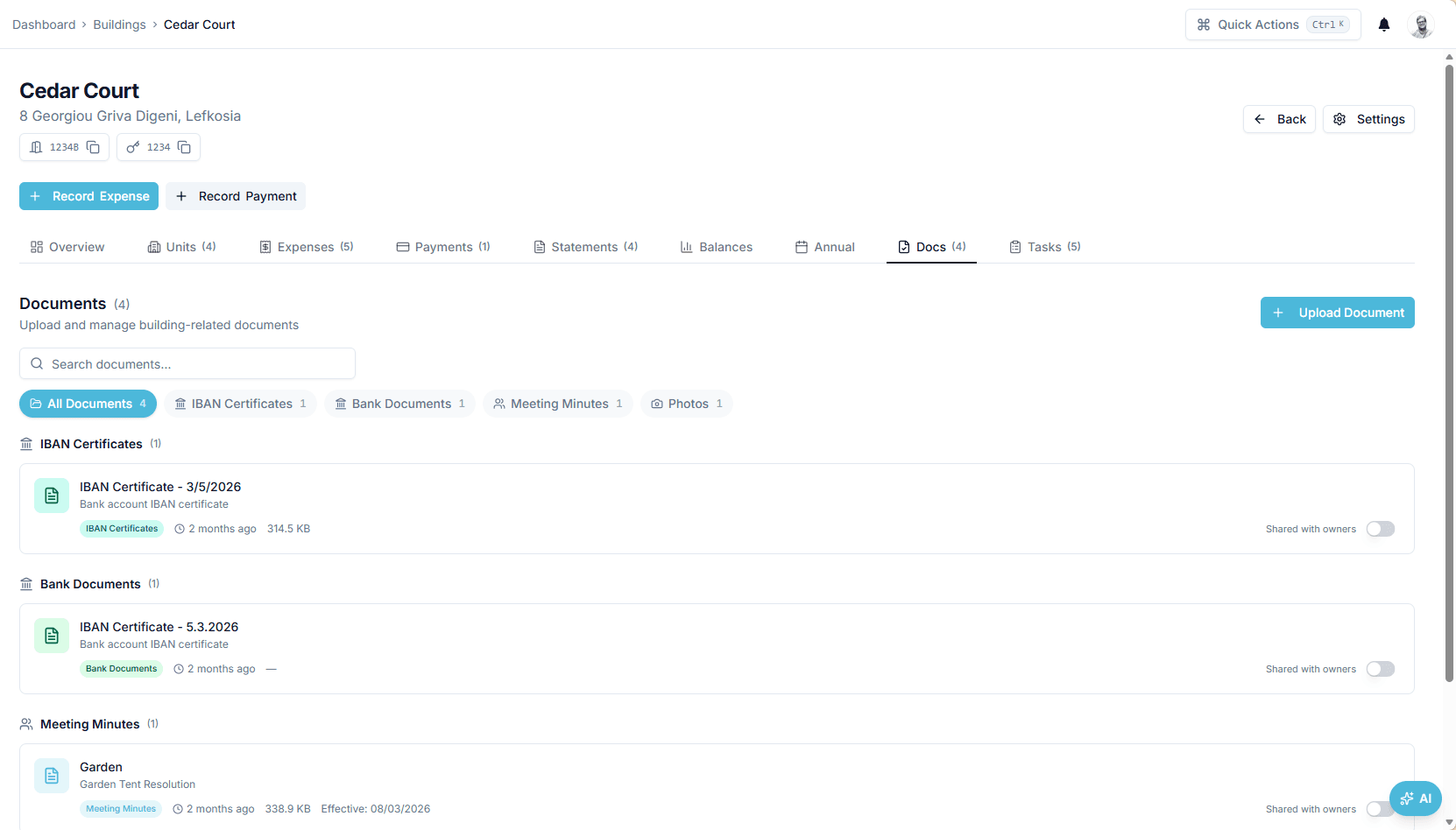
Documents tab of a building with category filters — IBAN certificates, bank documents, meeting minutes — and file cards showing category, upload time and size

Interface shown is from an earlier version

Outcome

A new version supersedes the old one and keeps it in the history, and downloads use signed links that expire rather than public URLs.

In practice

Why teams use this feature

What managers and committees tell us it changes in the monthly routine.

  • Categories per file: invoices, banking, contracts, insurance, certificates, minutes, photos

  • Versioning: a replacement supersedes; the history stays

  • Per-file 'shared with owners' switch; one-hour signed download links

  • Categories for invoices, banking documents, contracts, certificates and photos

  • Version history per document

  • Signed download links that expire

  • Owners reach the documents shared to their building through the portal

How it works

What this feature does

Every file — invoice, IBAN certificate, contract, policy, inspection certificate, meeting minutes, photos — is stored on its building under a category, searchable and filterable. Replace a file and the new version supersedes the old, which stays in the history. Photos uploaded together are grouped as one album. A 'shared with owners' switch per document decides what appears in the owner portal. Downloads use signed links that expire after one hour.

01

Where is the invoice behind that charge?

On the expense. When an invoice is uploaded to create an expense, the PDF is filed in the building's documents and linked to the expense; the owner's statement line can open it if the file is shared. The same happens for IBAN certificates from banking settings, policies from insurance, certificates from inspections and minutes from meetings — records file their own evidence.

02

What happens when a file is replaced

Upload the corrected policy schedule over the old one: the new document carries version 2 and a reference to the one it supersedes; listings show the latest version only, and the history shows both with their timestamps. Nothing is overwritten. Meeting minutes carry an effective date; certificates carry their inspection date.

03

How site photos stay together

Upload the eight photos from the roof inspection in one go and they share a group, shown as one album on the building rather than eight cards. When the owner asks what the €18,600.00 reserve expense paid for, share the album and the before-and-after photos sit beside the charge in the portal.

04

Who can open what?

Team members see the building's files, subject to their building membership. Owners see only files switched to 'shared with owners' for their building, in the portal. Every download is a signed link valid for one hour, so a forwarded link stops working. Preview opens in the browser without downloading. Row-level security scopes the document records to the company.

In the product

See it on the screen

https://domera.cy/dashboard/buildings

Building settings

Building settings page with tabs for basics, address, banking, team, committee, categories, image, access, service provider, share calculation, reserve fund, recurring expenses and opening balances

Related

Keep exploring

  • AI building assistant

    Ask about any building, owner or balance in plain language; the Domera assistant answers from your company's own records.

    Learn more
  • Smart allocation engine

    Allocate every common expense by ownership share, floor area, equal parts, floor level, lift share or a custom rule.

    Learn more
  • Owner portal transparency

    Owners sign in and read their own units' statements, balances, payments, documents, compliance status and meetings.

    Learn more

FAQ

Frequently asked questions

More answers on the full FAQ page.

Can we store both financial and operational files?
Yes. Invoices, IBAN certificates and bank documents, contracts, insurance policies, inspection certificates, meeting minutes and photos share one archive per building, filtered by category.
Do document versions stay visible?
Yes. A replacement carries the next version number and a reference to the file it supersedes; listings show the latest and the history shows every version with its timestamp.
Can teams preview files before downloading?
Yes. Preview opens in the browser; downloads use a signed link that expires after one hour.

Start with one building

Ready to put the building's books in order?

Start the 14-day trial, add the first building and run one month through it. Import the owners, post the invoices, issue the statements.

  • 14-day free trial
  • No credit card required
  • Cancel any time