Policies and contracts with dates that drive the rest

Contracts & insurance lifecycle

Keep every service contract and insurance policy in a register with its dates, premium, cover and source document.

https://domera.cy/dashboard/buildings
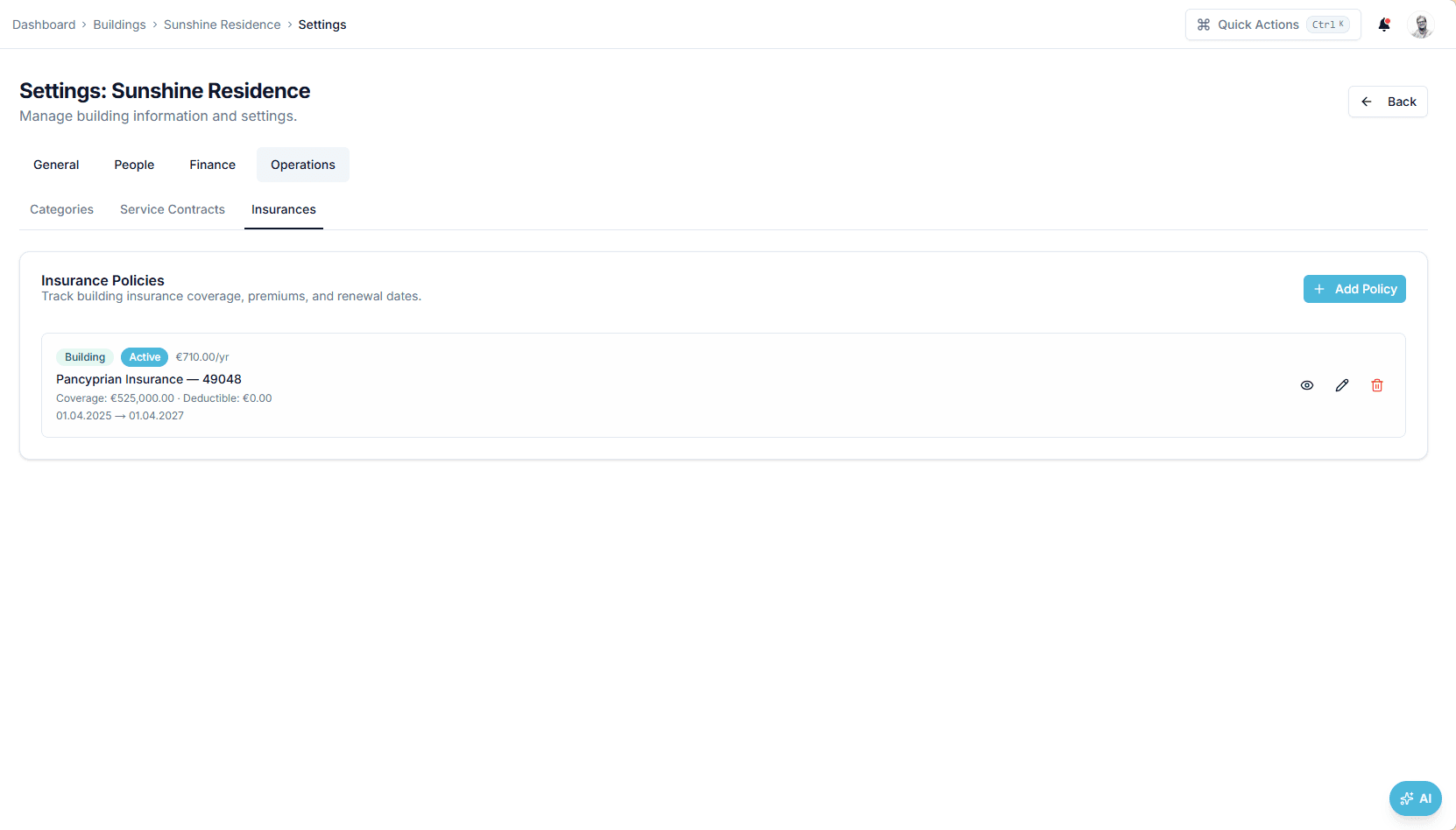
Insurance policies tab for a building showing one active policy: insurer and policy number, €710.00 a year, coverage €525,000.00, deductible €0.00, valid 01.04.2025 to 01.04.2027

Interface shown is from an earlier version

Outcome

Key dates and amounts are read from the uploaded document and proposed for confirmation; expired or expiring insurance lowers the building's health score.

In practice

Why teams use this feature

What managers and committees tell us it changes in the monthly routine.

  • Active and expired status derived from the dates

  • Premium, coverage, deductible and annual cost per policy; cost model and frequency per contract

  • Policy expiry and contract service dates feed compliance and the health score

  • Active or expired status per contract and policy

  • Cover, premium, deductible and renewal date per policy

  • Document reading drafts the fields; you confirm before anything is saved

  • Renewals appear in the Action centre before the date

How it works

What this feature does

Store each service contract and insurance policy on the building: vendor or insurer, cost model, frequency, coverage, premium, deductible, start and end dates, and the document behind it. Upload the PDF and the fields are read for you to confirm. From there the dates work: an expiring policy lowers the health score and appears in the Action centre; a contract's service date drives the linked compliance requirement.

01

Which dates matter on a building policy?

Start, end, and the 30 days before the end. The €710.00-a-year building policy with €525,000.00 coverage is 'active' until 1 April 2027; from 2 March 2027 it is 'expiring soon' (−10 health points), from 2 April 'expired' (−15). Across Europe buildings insurance is a duty or near-universal practice — compulsory for French copropriétés since the loi ALUR; in Cyprus typically required by the building's regulations. Confirm locally.

02

How the contract's dates set the inspection

A fire-safety servicing contract with frequency 'every 6 months' and a next service date is linked to the compliance item 'Fire safety equipment service' with schedule source 'contract'. The item's due date follows the contract. Renew the contract and the item follows. The lift is the exception: its inspection stays manual, so the certificate is recorded when it exists, not assumed from the contract.

03

What the document reader fills in

Upload the policy PDF: insurer, policy number, premium, coverage, deductible, start and end dates are read into the form. Upload the contract: vendor, cost model (annual fee or flexible), frequency, dates. Vendor names are matched against your vendor list for you to confirm or correct. Nothing is saved until you press save; the PDF stays on the building with the record it created.

04

Where the renewal shows up

In three places: the Action centre row for insurance expiring, the building health score, and the daily smart alert 'insurance expiring' or 'service contract expiring' if you have created that rule. A recurring expense template can carry the premium so the cost recurs with the policy. When the insurer sends the renewal, add the new policy; the expired one keeps its status and dates.

In the product

See it on the screen

https://domera.cy/dashboard/buildings

Interface shown is from an earlier version

The documents behind the records

Documents tab of a building with category filters — IBAN certificates, bank documents, meeting minutes, photos — and a 'shared with owners' switch on each file

Related

Keep exploring

  • AI building assistant

    Ask about any building, owner or balance in plain language; the Domera assistant answers from your company's own records.

    Learn more
  • Smart allocation engine

    Allocate every common expense by ownership share, floor area, equal parts, floor level, lift share or a custom rule.

    Learn more
  • Owner portal transparency

    Owners sign in and read their own units' statements, balances, payments, documents, compliance status and meetings.

    Learn more

FAQ

Frequently asked questions

More answers on the full FAQ page.

Can Domera alert the team to expiring policies and contracts?
Yes. A policy within 30 days of its end date appears in the Action centre and lowers the health score; smart alert rules for 'insurance expiring' and 'service contract expiring' send notifications from the daily 06:00 check.
Do we have to type everything manually?
No. Upload the policy or contract PDF and insurer or vendor, amounts, frequency and dates are read into the form. You check and confirm before saving.
Can we keep the source document attached?
Yes. The uploaded PDF is stored in the building's documents and linked to the policy or contract record, with preview and a signed download link.

Start with one building

Ready to put the building's books in order?

Start the 14-day trial, add the first building and run one month through it. Import the owners, post the invoices, issue the statements.

  • 14-day free trial
  • No credit card required
  • Cancel any time