The document is read before you type

AI banking & document extraction

Photograph or upload an invoice, IBAN certificate, business card, contract or inspection certificate, and the fields are read and drafted for you.

https://domera.cy/dashboard/buildings
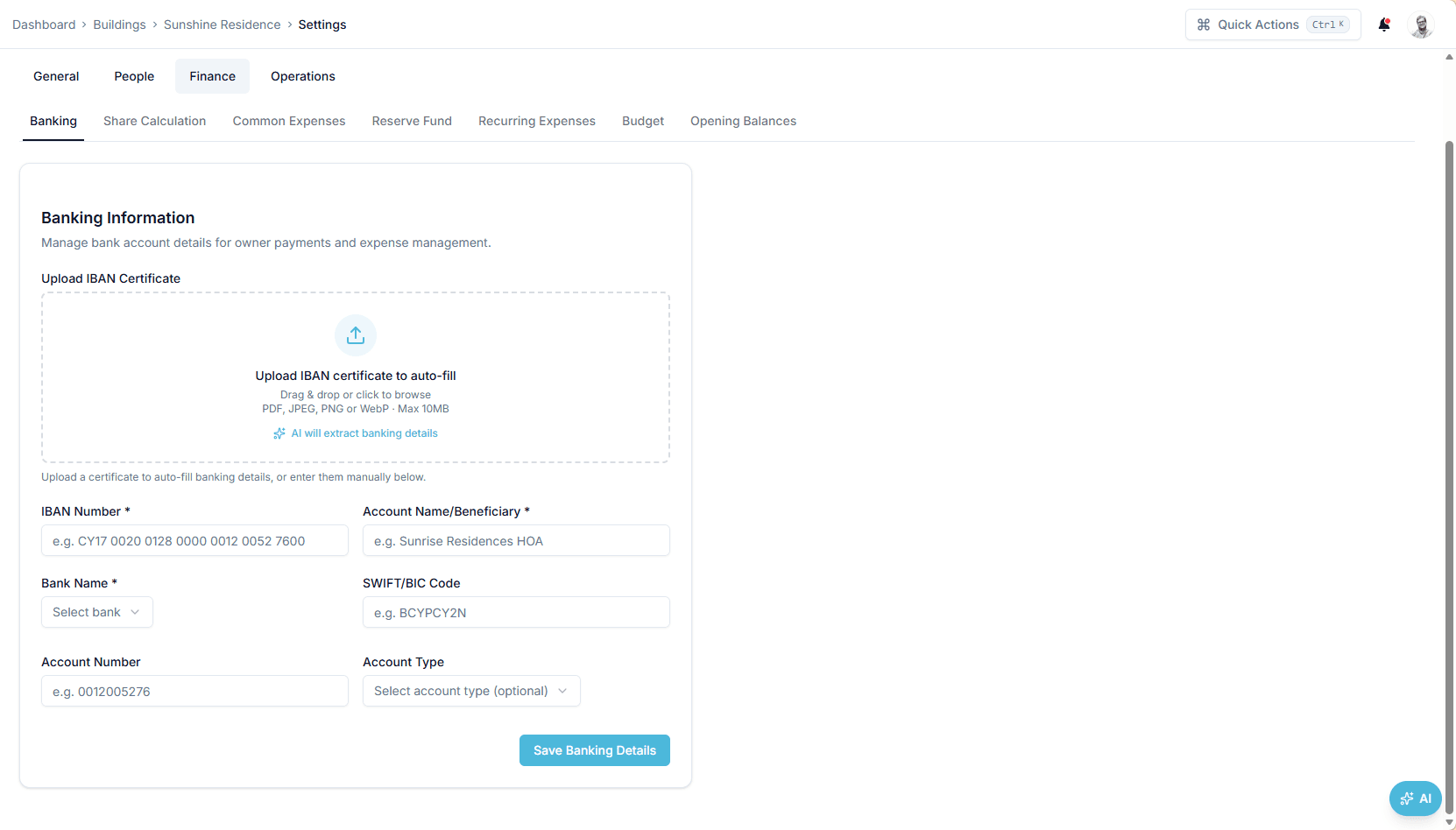
Banking settings for a building with an 'upload IBAN certificate to auto-fill' drop zone above IBAN, beneficiary, bank, SWIFT/BIC, account number and account type fields

Interface shown is from an earlier version

Outcome

Extraction produces a draft — vendor, amounts, VAT, dates, IBAN and BIC — that you check and confirm; nothing is saved until you do.

In practice

Why teams use this feature

What managers and committees tell us it changes in the monthly routine.

  • IBAN certificates, invoices, contracts, insurance policies and inspection certificates read into draft fields

  • Every value shown for confirmation before it is saved

  • Bank descriptions parsed to suggest owner and unit

  • Supplier invoice to draft expense, with VAT and period

  • IBAN and BIC read from bank certificates and checked against the country's IBAN format

  • Contract, insurance and inspection dates proposed for the registers

  • Bank statement descriptions parsed to suggest the paying owner

How it works

What this feature does

Upload an IBAN certificate, a supplier invoice, an insurance policy, a service contract or an inspection certificate and the key fields are read — IBAN and BIC, vendor and amounts, VAT and dates, policy number and premium, inspector and result — into a draft for you to check. Nothing is saved until you confirm. Bank statement descriptions are parsed to suggest which owner a payment belongs to.

01

Which documents can be read?

Five kinds today: supplier invoices (vendor, net, VAT, gross, invoice number, dates, period); IBAN certificates and bank letters (IBAN, BIC, bank, beneficiary); insurance policies (insurer, policy number, premium, coverage, deductible, dates); service contracts (vendor, cost model, frequency, dates); inspection certificates (inspector, date, result, next due). Business cards are read into vendor contacts. Accepted: PDF or image, up to 10 MB.

02

What happens between upload and save

The file is stored in the building's documents first, then read. The model returns the fields it found and the form fills in with them; fields it cannot find stay blank. You read the form against the document — the IBAN's country code and length, the VAT figure — and press save. Until then nothing has been written to the bank details, the expense or the policy.

03

Does it know Cypriot banks — and German ones?

The reader is given the shape to expect: a Cyprus IBAN starts with CY and has 28 characters, a German one starts with DE and has 22, a BIC has 8 or 11. Bank names common in Cyprus — Bank of Cyprus, Eurobank, Ancoria — are listed as examples, but any bank's certificate can be read. Check the country code and length before saving; the checksum is not validated.

04

What the bank statement parser does — and does not

Import a statement and each description is parsed to suggest the owner or unit it refers to — 'A. Georgiou A-101 May' becomes unit A-101 — alongside the deterministic match on payment reference code and amount. Suggestions carry a confidence figure. You accept or correct; the parser never records a payment on its own, and a rejected suggestion writes nothing.

In the product

See it on the screen

https://domera.cy/dashboard/buildings

Interface shown is from an earlier version

A policy stored from its document

Insurance policies tab showing one active building policy with annual premium €710.00, coverage €525,000.00, deductible €0.00 and its validity period

Related

Keep exploring

  • AI building assistant

    Ask about any building, owner or balance in plain language; the Domera assistant answers from your company's own records.

    Learn more
  • Smart allocation engine

    Allocate every common expense by ownership share, floor area, equal parts, floor level, lift share or a custom rule.

    Learn more
  • Owner portal transparency

    Owners sign in and read their own units' statements, balances, payments, documents, compliance status and meetings.

    Learn more

FAQ

Frequently asked questions

More answers on the full FAQ page.

Which banks' certificates can be read?
Any bank's IBAN certificate or account letter in PDF or image form. The reader is primed with Cyprus examples (Bank of Cyprus, Eurobank, Ancoria) and the IBAN shape per country; it reads German, Greek or other European certificates the same way. Check the extracted IBAN against the document before saving.
Is extracted data saved automatically?
No. Every extracted value is placed in the form for you to check and correct. It is saved only when you submit the form.
Can we use extraction for documents beyond banking certificates?
Yes. Supplier invoices, insurance policies, service contracts, inspection certificates and business cards are read into their respective forms — expense, policy, contract, inspection record, vendor contact.

Start with one building

Ready to put the building's books in order?

Start the 14-day trial, add the first building and run one month through it. Import the owners, post the invoices, issue the statements.

  • 14-day free trial
  • No credit card required
  • Cancel any time