What needs doing this morning, by building

Action centre & health scoring

Open the day on one list of what is due across the portfolio: inspections, renewals, meetings, reminders and tasks.

https://domera.cy/dashboard
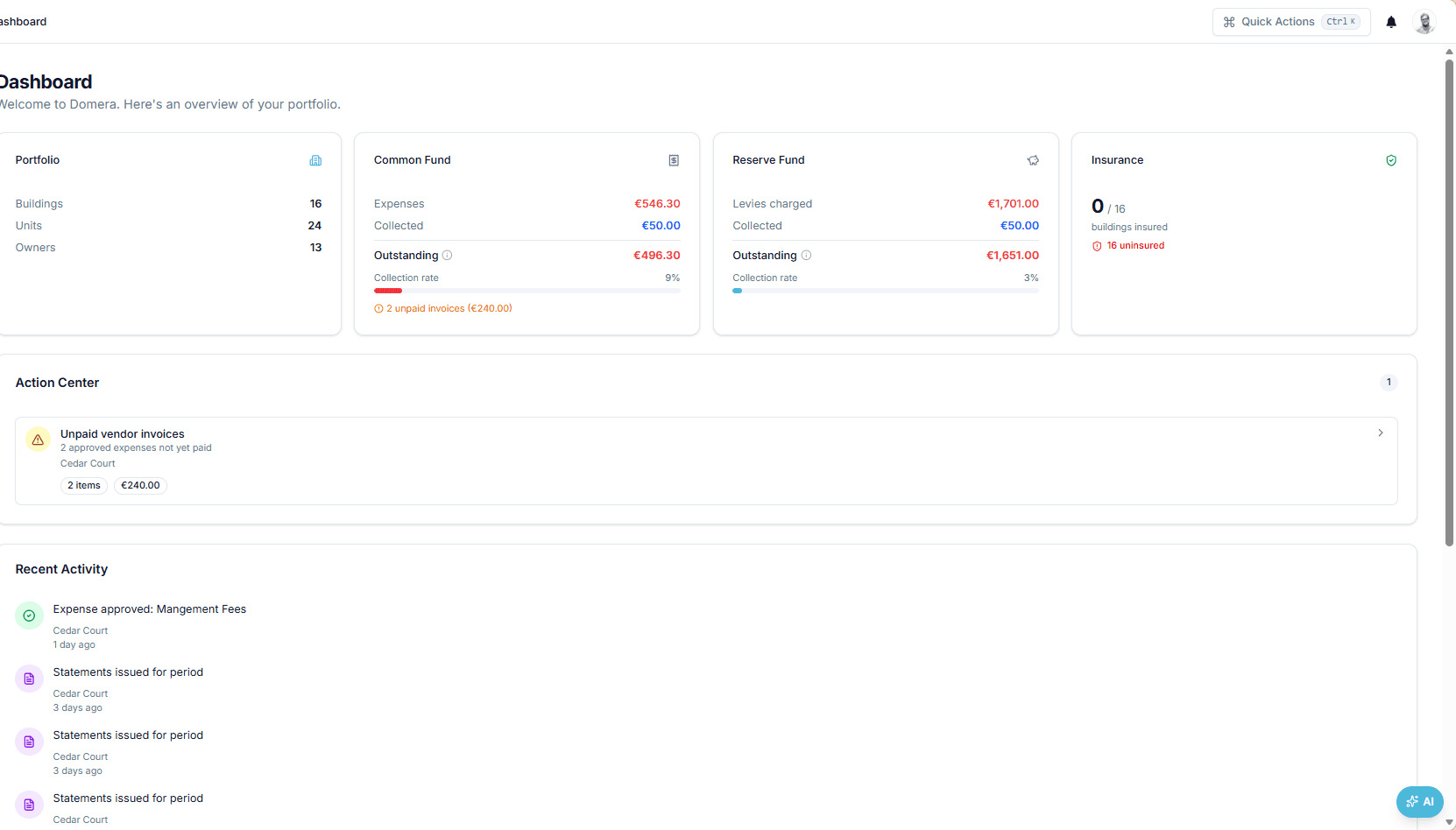
Dashboard with portfolio, common fund, reserve fund and insurance cards, one Action centre item — draft expenses need approval, €40.00, one building — and recent activity

Interface shown is from an earlier version

Outcome

The health score starts at 100 and deducts for a collection rate below 90 %, outstanding balances, draft expenses, overdue tasks, insurance status and overdue inspections.

In practice

Why teams use this feature

What managers and committees tell us it changes in the monthly routine.

  • Health score from six measured signals: collection rate, outstanding balance, draft expenses, overdue tasks, insurance, compliance

  • Each Action centre row opens the screen where it is resolved

  • Out-of-pattern feed: invoices well above the norm, possible duplicates, collection drops

  • Action centre groups compliance, insurance, contract, meeting, reminder and task items by due date

  • Out-of-pattern feed: invoices well above the norm, possible duplicates, a fall in collections, stale unmatched payments

  • Worst five buildings by score, with the reason for each deduction

  • Managers see their assigned buildings, admins the whole company

How it works

What this feature does

Open the dashboard and the Action centre lists what is waiting: draft expenses to approve, overdue tasks, expiring policies, overdue inspections, buildings whose collection rate has dropped — each with the building, the count and the amount. Every building carries a health score from 0 to 100, computed from six measured signals, so a list of forty buildings sorts itself by where attention is due.

01

Which building do I open first?

The one with the lowest health score. Every building starts at 100 and loses points for measured conditions: up to 30 for a collection rate below 90 %; up to 20 for outstanding balances above €1,000.00; 5 per draft expense (maximum 15); 5 per overdue task (maximum 20); 15 for an expired policy, 10 for one expiring within 30 days; 10 per overdue inspection (maximum 20).

02

What the Action centre puts in front of you

Draft expenses awaiting approval, with count and total — '1 expense, €40.00, Sunshine Residence'. Overdue tasks. Policies expired or expiring. Compliance items overdue or due soon. Buildings whose collection rate has fallen. Each row names the building and opens the tab where the work is done — the expense list, the task, the policy — rather than a report about it.

03

Where do the numbers come from?

From the same tables the rest of the product uses. Collection rate is payments received over amounts billed on finalised statements; outstanding balance is the sum of unit balances; draft count is expenses in draft status. The score is recomputed each time the page loads, so approving the draft and recording the payment move the number at once. No score is entered by hand.

04

How managers and admins see it differently

An admin sees the whole company; a manager sees the buildings assigned to them through building membership, so their Action centre is already their portfolio. Daily jobs feed it: task reminders at 07:00, compliance checks and smart alerts at 06:00, payment reminders on Mondays at 08:00. Smart alert rules — no expense this month, balance above a threshold, budget exceeded — add rows of your own.

In the product

See it on the screen

https://domera.cy/dashboard/buildings

Health score per building

Buildings grid where every card shows the building health score and collection rate

Related

Keep exploring

  • AI building assistant

    Ask about any building, owner or balance in plain language; the Domera assistant answers from your company's own records.

    Learn more
  • Smart allocation engine

    Allocate every common expense by ownership share, floor area, equal parts, floor level, lift share or a custom rule.

    Learn more
  • Owner portal transparency

    Owners sign in and read their own units' statements, balances, payments, documents, compliance status and meetings.

    Learn more

FAQ

Frequently asked questions

More answers on the full FAQ page.

How is the building health score calculated?
Start at 100 and deduct per signal, each capped: collection rate below 90 % (up to 30 points), outstanding balance above €1,000.00 (up to 20), draft expenses (5 each, up to 15), overdue tasks (5 each, up to 20), insurance (15 expired, 10 expiring within 30 days), compliance (10 per overdue inspection up to 20, or 5 if items are due soon). The result is banded: 90+ excellent, 75–89 good, 50–74 fair, below 50 attention.
Can we narrow the Action centre to part of the portfolio?
Managers see only the buildings assigned to them; admins see all. The buildings grid and map filter by city, unit count and insurance status, and each Action centre row names its building.
Does the Action centre replace individual building dashboards?
No. It ranks where to look; each row opens the building tab where the item is resolved — expenses, tasks, insurance, compliance.

Start with one building

Ready to put the building's books in order?

Start the 14-day trial, add the first building and run one month through it. Import the owners, post the invoices, issue the statements.

  • 14-day free trial
  • No credit card required
  • Cancel any time