Why is a fixed allocation key not enough?
The title deed gives every unit a share of the common areas, and most common expenses follow it: insurance, the lift contract, the management fee. Three cost types routinely do not. Water in a building with one supply meter is used by people, not by square metres; a one-bedroom flat with a single occupant and a four-bedroom flat with a family of five hold very different shares of the bill. Refuse collection, where the municipality charges the building as a whole, behaves the same way. Heating or hot water from a central boiler is often read on a sub-meter per unit and allocated by consumption.
Most regimes allow it. Across Europe the deed share is the default key, and the building's regulations or a general meeting may typically set a different key for a specific cost type where usage differs; in Cyprus, for example, the regulations of a jointly owned building are the place to record such a rule, and in Germany the owners' assembly has been able to change the Verteilungsschlüssel for individual cost types by majority since the 2020 reform. The wording and the majority differ by country, so confirm with the regulations and, where in doubt, the competent authority. How common expenses are allocated covers the standard keys.
What these cases share is that the key is a number the unit table does not know. Domera's five standard methods read fixed columns: ownership share, floor area, floor level, lift share, or one equal part each. Unit attributes add the missing numbers, and one new method reads them.
What is a unit attribute?
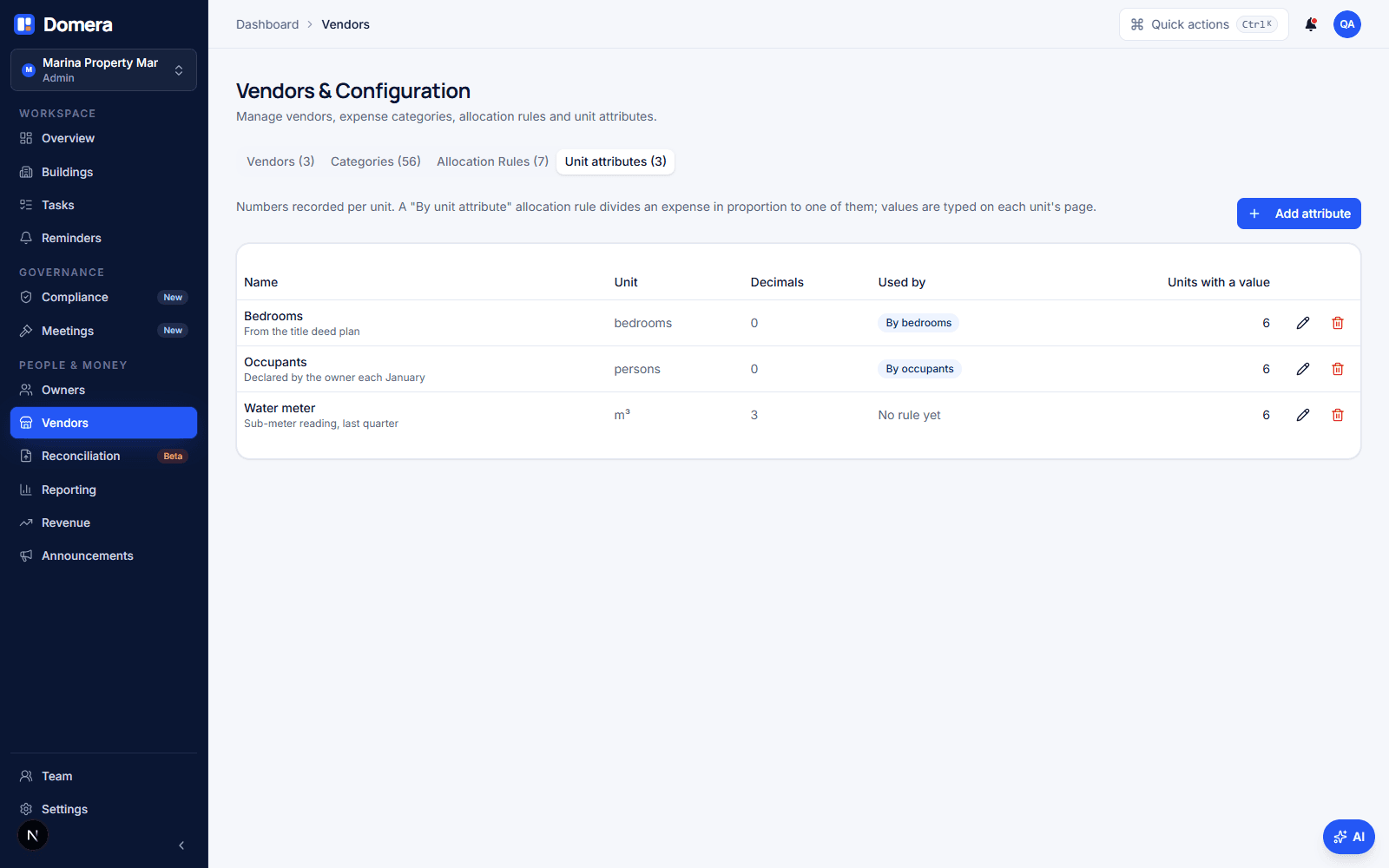
A unit attribute is a named number recorded per unit: Bedrooms, Occupants, Water meter (m³), Parking spaces, Balcony area. The list of attributes belongs to the company, so "Bedrooms" means the same thing in every building you manage and one allocation rule can use it everywhere. Each attribute has a unit label that is shown next to the value, and a number of decimals: 0 for bedrooms and persons, 3 for a meter reading.
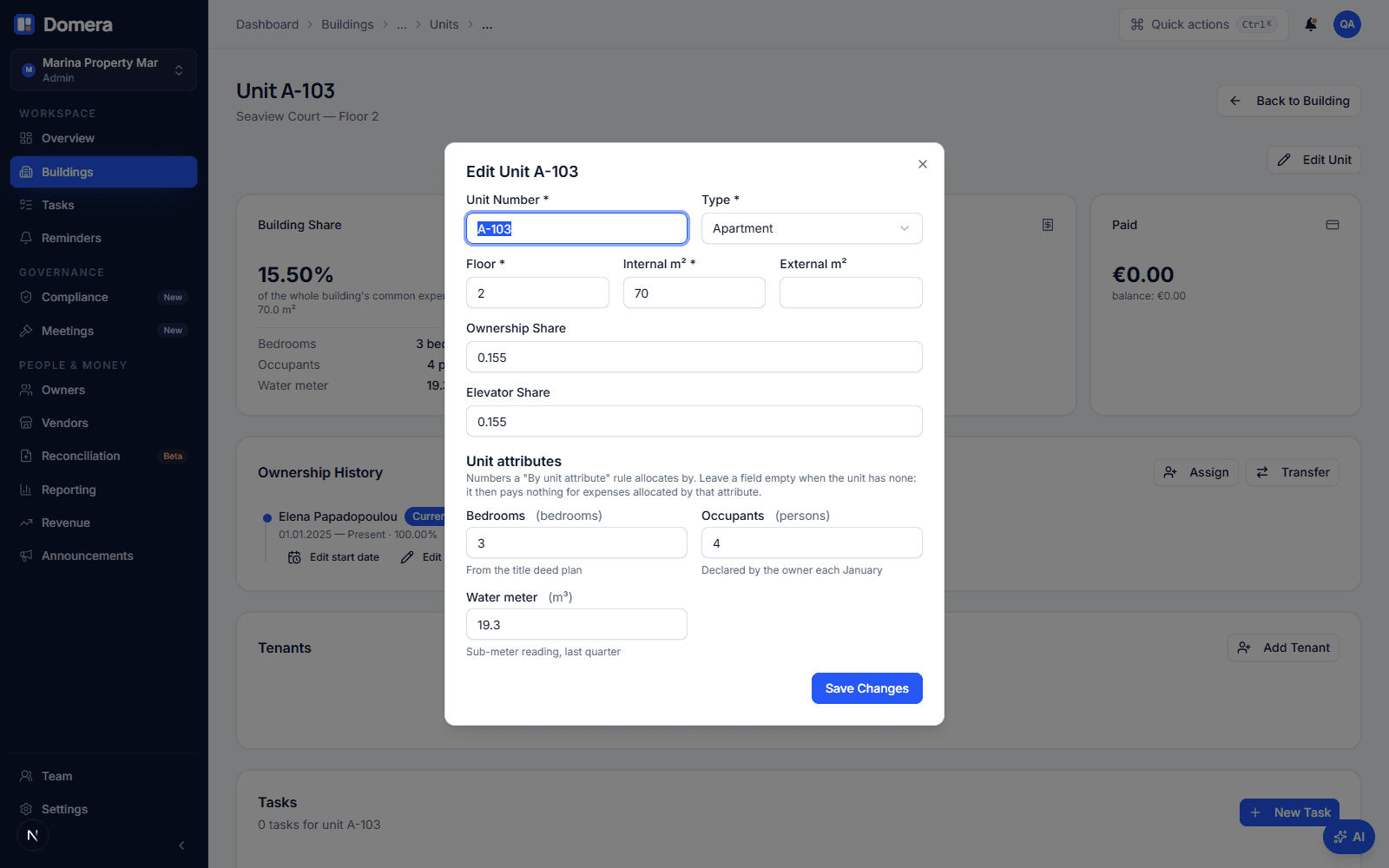
The values belong to the unit. They are typed on the unit page, next to the ownership share, and only an admin can change them, for the same reason only an admin can change a share: the number feeds the allocation engine. A unit without a value counts as 0 and pays nothing for an expense allocated by that attribute; the unit page says so in plain words rather than hiding the gap.
The attributes live under Vendors & configuration, in a tab of their own next to the allocation rules, because that is where the rules that use them are managed.
How do I set one up?
Four steps, each in a place you already use. First, define the attribute: Vendors & configuration › Unit attributes › Add attribute, give it a name, a unit label and the decimals. Second, type the values: open each unit, choose Edit unit, and fill in the new field under the shares. When you add a unit the same field is on the first step of the dialog, so a new flat gets its bedrooms with its area.
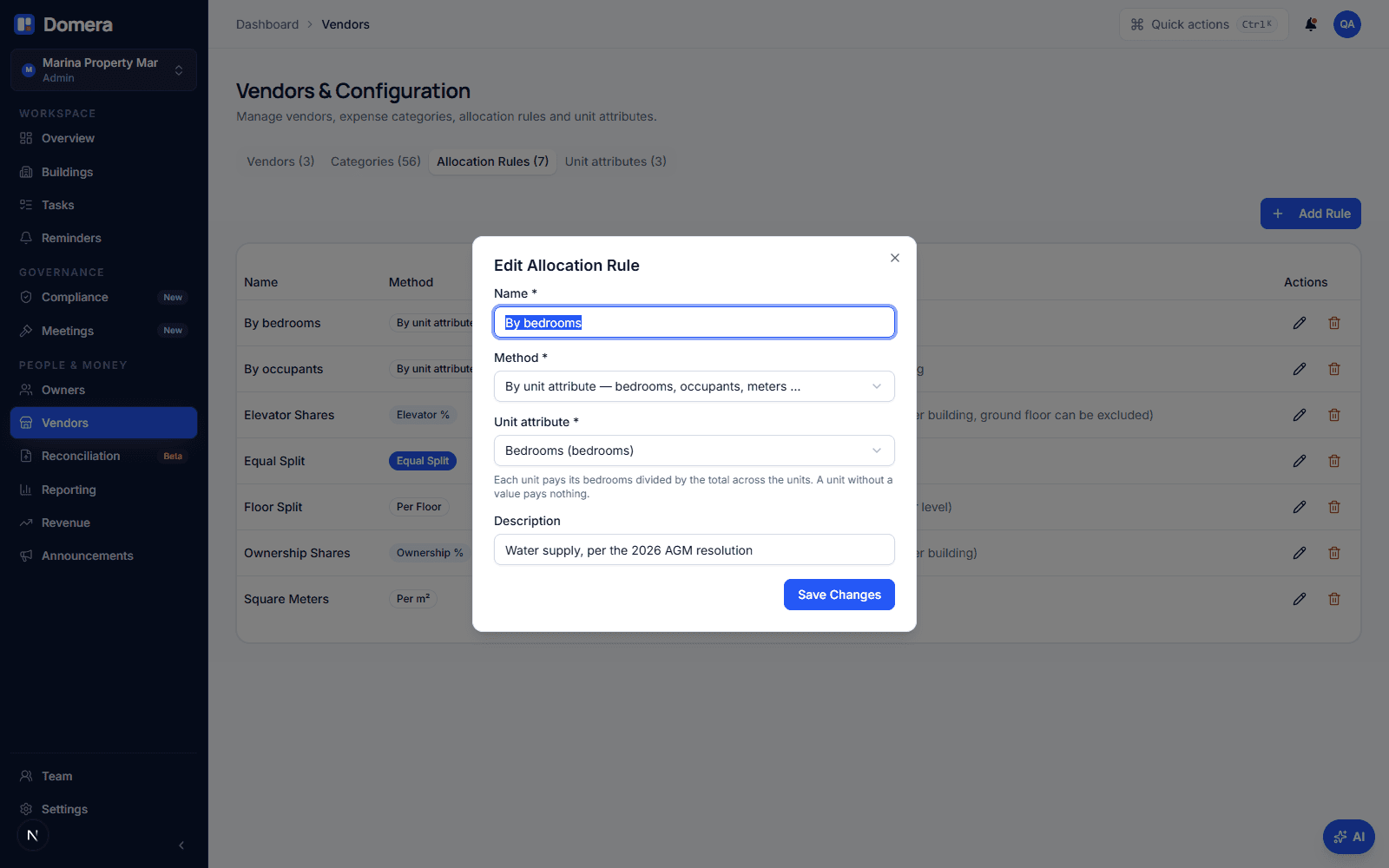
Third, create the rule: Allocation rules › Add rule, choose the method By unit attribute, and pick the attribute. The rule list then reads "By unit attribute · Bedrooms", which is what the person recording an invoice sees. Fourth, point a category at the rule, exactly as for any other method: a Water supply category with By bedrooms as its default rule means every water invoice is pre-set to that rule, and the budget line of that category is levied by it too.
Nothing else changes. Vendors still carry a category, the category still carries the rule, the invoice is still recorded and approved the same way. If one building needs a different key for the same category, use a sub-category or a second rule; the method stays one attribute per rule.
What happens when the bill arrives?
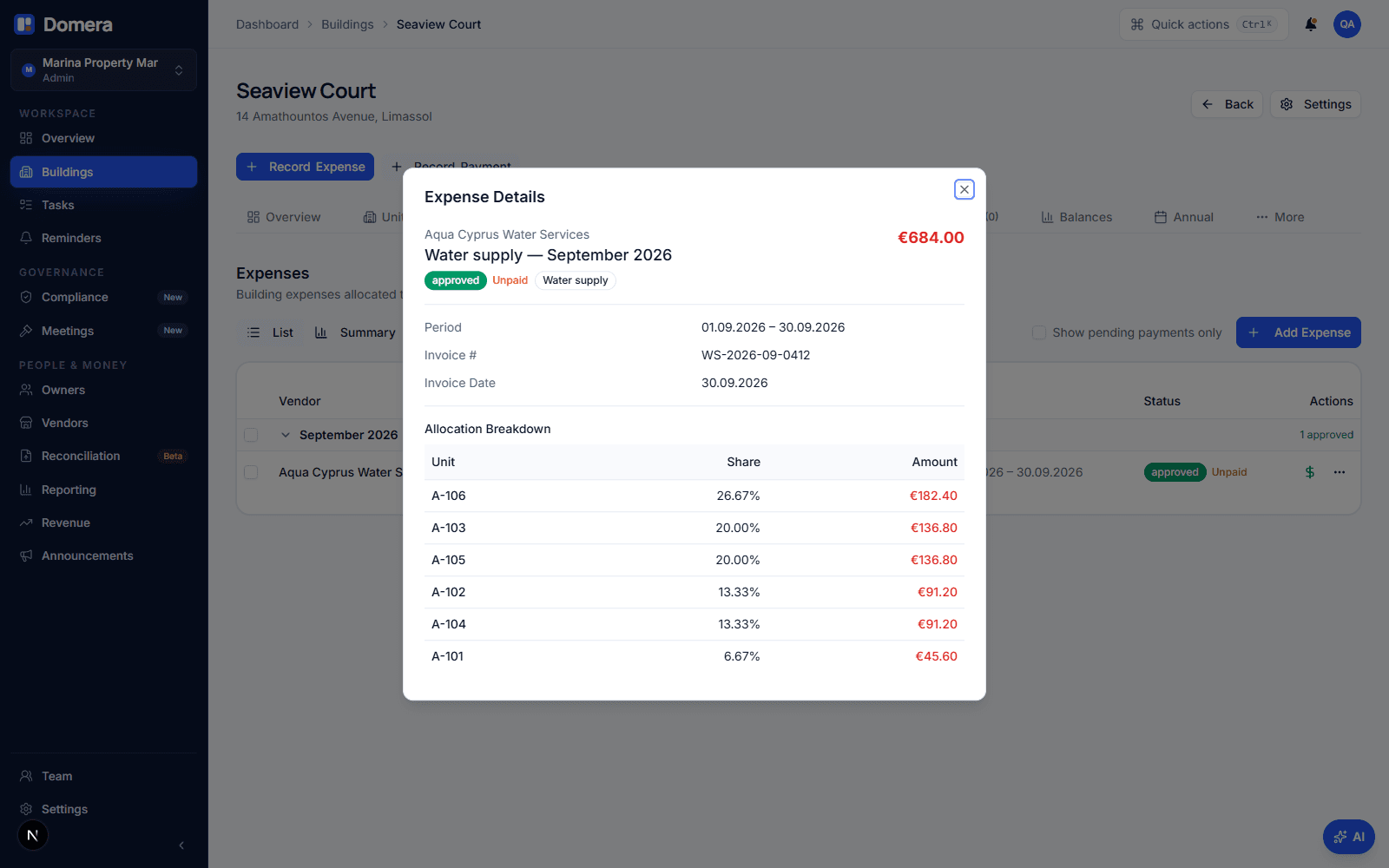
Approval allocates the invoice. For a By bedrooms rule the engine adds up the bedrooms of the units the expense applies to, gives each unit its bedrooms divided by that total, and distributes the amount by the largest-remainder method so the allocations add up to the invoice to the cent. At Seaview Court the six flats have 1, 2, 2, 3, 3 and 4 bedrooms, fifteen in all. A water invoice of €684.00 is €45.60 per bedroom: €45.60, €91.20, €91.20, €136.80, €136.80 and €182.40.
| Unit | Bedrooms | Share | Pays |
|---|---|---|---|
| A-101 | 1 | 6.67 % | €45.60 |
| A-102 | 2 | 13.33 % | €91.20 |
| A-103 | 3 | 20.00 % | €136.80 |
| A-104 | 2 | 13.33 % | €91.20 |
| A-105 | 3 | 20.00 % | €136.80 |
| A-106 | 4 | 26.67 % | €182.40 |
The share stored on each allocation is the unit's share of the attribute total, so A-103 with three bedrooms shows 20.00 %, whatever its share of the deed. If the expense also applies to a block or a lift group, the scope is applied first and the attribute total is taken over the units in that group only. An expense whose units have no values at all is refused at approval with the reason: the total is 0 and nothing can be allocated. That refusal is deliberate; a silent fall-back to the ownership share would bill owners by a key nobody chose.
What do owners see?
The statement does not change shape. The water line appears like any other charge, with the unit's share next to it: 20.00 % for A-103. That percentage is the figure an owner will question, so it must be checkable. The owner portal shows the numbers the manager holds for the unit, Bedrooms 3 and Occupants 4, next to the ownership share, and the unit page in the dashboard shows the same values with an edit button for the admin. An owner who disputes the count disputes a fact, which is a short conversation; a share with no visible basis is a long one.
A unit with no value is shown with a dash and the words "pays 0", not as a blank. If that unit should be paying, the missing number is the problem to fix, and after the fix the open charges are re-allocated automatically, as the next section explains. How to read your common expense statement covers the statement lines themselves.
What happens when a value changes?
A value changes when a family moves in, a meter is read, or a typo is found. Saving the new value re-allocates every approved expense in that building that is not yet on a statement, re-posts the unbilled levies, and leaves everything already billed exactly as it was. If A-106 is corrected from 4 to 5 bedrooms, the water invoice above is re-allocated over sixteen bedrooms: €42.75 per bedroom, A-106 at €213.75, every other unit a little less, the total still €684.00. An invoice already on a finalised statement is a document the owner has, and it is not touched.
The same applies to the rule. Change a rule from Ownership share to By occupants and every building with an approved, unbilled expense or a budget line on that rule is re-allocated. The rule's attribute cannot be removed while a rule names it; the message names the rules to change first. Reducing an attribute's decimals below what stored values already carry is refused too, naming the units, so no number is silently rounded.
Budgets follow the same key. In budget levy mode a budget line whose category defaults to a By occupants rule is levied across the units by their occupant counts, the levy calculation report shows the per-unit result, and the AGM budget slide computes its live per-unit impact with the stored values. Reserve fund levies stay on the deed share.
Checklist
- Check the regulations before changing a key: the deed share is the default, and a different key for a cost type is a decision to record, not a setting to try.
- Define the attribute with the right decimals: 0 for bedrooms and persons, 3 for meter readings. Decimals can go up later, but not down past a stored value.
- Type a value for every unit before the first invoice is approved. A unit without a value pays nothing, and the unit page tells you which ones those are.
- Create one rule per attribute and give it a plain name: By bedrooms, By occupants, By water meter.
- Point the category at the rule, so every invoice of that type is pre-set and the budget line is levied the same way.
- After a correction, open the expenses tab: approved, unbilled invoices are re-allocated at once, and anything already on a statement stays as billed.
Frequently asked questions
- Can I combine two attributes, or write a formula?
- No. A rule allocates by exactly one attribute, and there is no formula editor: a key that cannot be explained in one sentence to an owner is a key that will be disputed. If two cost types need two keys, create two attributes and two rules; if one invoice genuinely covers both, record it as two expenses.
- What happens to a unit with no value?
- It receives an allocation of €0.00 for every expense allocated by that attribute, and the other units carry the whole amount. The unit page shows the attribute as a dash with the words "pays 0", so the gap is visible. If every unit has no value, or all values are 0, approval is refused with that reason.
- Do the allocations always add up to the invoice?
- Yes. Shares are rounded to six decimals for display, but amounts are distributed in cents by the largest-remainder method, the same way as for every other allocation method, so the sum of the allocations is the invoice total to the cent.
- Who can change the values, and who can see them?
- Only an admin of the company can define attributes or change a unit's value, because the numbers feed the allocation engine, exactly as ownership shares do. Every member of the company can see them, and an owner sees the values recorded for their own unit in the owner portal.
- Does a changed meter reading rewrite old statements?
- No. A value is the current state of the unit, like its ownership share. Changing it re-allocates approved expenses that are not yet on a statement and re-posts unbilled levies; charges already on a finalised statement are not touched. A reading that should apply from a given date is a question of when you record it.