Why is one building share not enough for a complex?
The title deed of a unit in a complex gives it a share of the whole jointly owned property, say 2.4 %. The pool, the gardens, the gate and the insurance are allocated by that share, and so they should be. The lift in Block B, the cleaning of Block B's stairwell and the roof over Block B are a different matter: the owners in Block A do not use them, and in most regulations they do not pay for them. Within its own block a unit therefore has a second share, say 12 %, and sometimes the deed states that second share directly.
The same two-tier scheme exists in every market Domera serves. France has general and special tantièmes per building or staircase, Italy keeps several millesimal tables, Spain has sub-communities with their own coefficients, and Cyprus regulations may define limited common areas per block. Modelling each block as a separate building breaks the legal picture: the committee, the bank account and the AGM are per complex, and an owner with units in two blocks would get two statements. Keeping one building and losing the block level breaks the money instead, because every lift bill lands on everyone.
Domera keeps the complex as one building and adds the block level as allocation groups.
What is an allocation group?
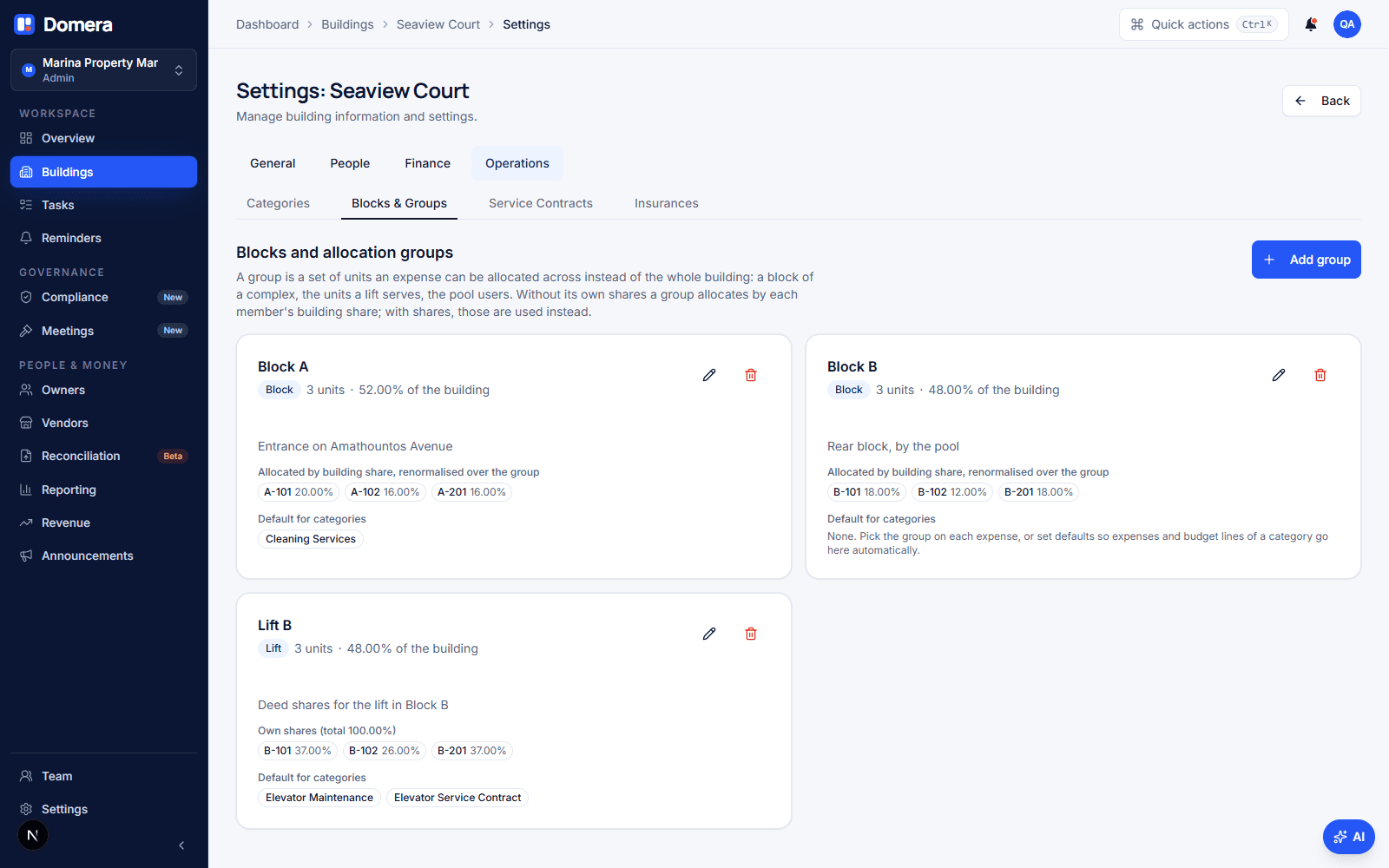
An allocation group is a named set of units inside a building that an expense can be allocated across instead of all units. Most groups are blocks. Others are the units a lift serves, the units with a parking space, or the villas that use a second pool. A unit can sit in several groups: it is in Block B and in "Lift B". The groups live under Settings › Operations › Blocks & groups, and only an admin can change them, for the same reason only an admin can change a unit's share: the figures feed the allocation engine.
Each group lists its units, shows how much of the whole building they hold together, and shows which expense categories default to it. Nothing about the rest of the building changes when you add a group. Expenses without a group are still allocated across every active unit, exactly as before.
Which shares does a group use?
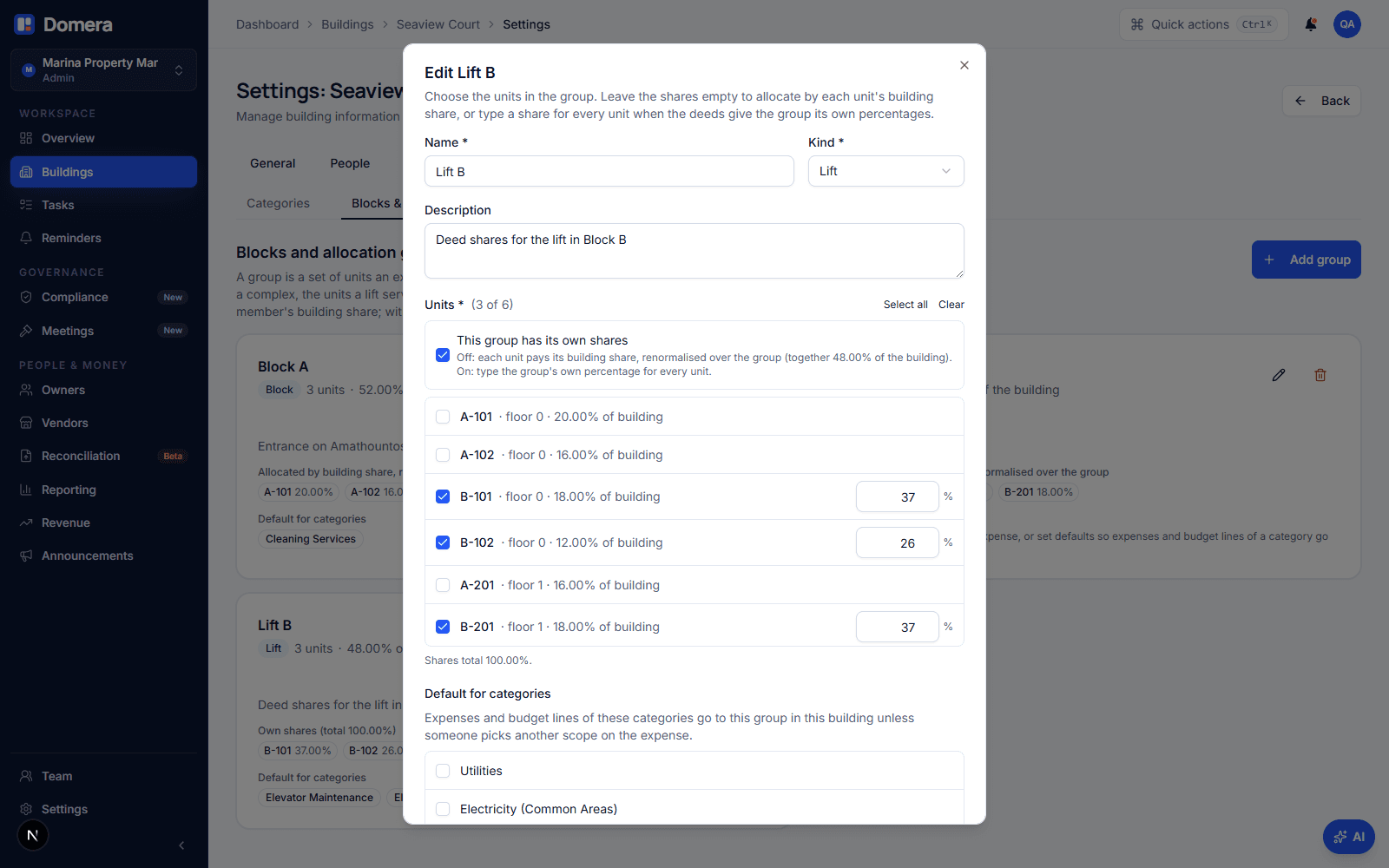
A group has two modes, and the difference is the X % and Y % question. With no shares of its own, the group allocates by each unit's building share, renormalised over the members. If Block B holds 48 % of the complex and unit B2 holds 12 %, then B2 pays 12 ÷ 48 = 25 % of anything allocated to Block B. This is right whenever the block shares are proportional to the complex-wide ones, which is the common case, and it needs no extra typing.
| Mode | Basis for B2 | B2 pays |
|---|---|---|
| Building shares, renormalised | 12 % of the complex ÷ 48 % held by Block B = 25 % | €300.00 |
| The group's own shares | 26 % typed from the deed | €312.00 |
| No group (whole complex) | 12 % of the complex | €144.00 |
When the deed or the regulations give the block its own percentages, switch on "This group has its own shares" and type a share for every unit in the group. Those percentages then replace the building share for that group, whether the category's allocation method says ownership share or lift share. Equal, floor-area and per-floor methods ignore shares either way. Domera refuses a mix of typed and empty shares, and a total above 100 %. A total under 100 % is allowed and renormalised, so a group of 48 % entered as deed figures still allocates the whole bill.
How do I put an expense on one block?
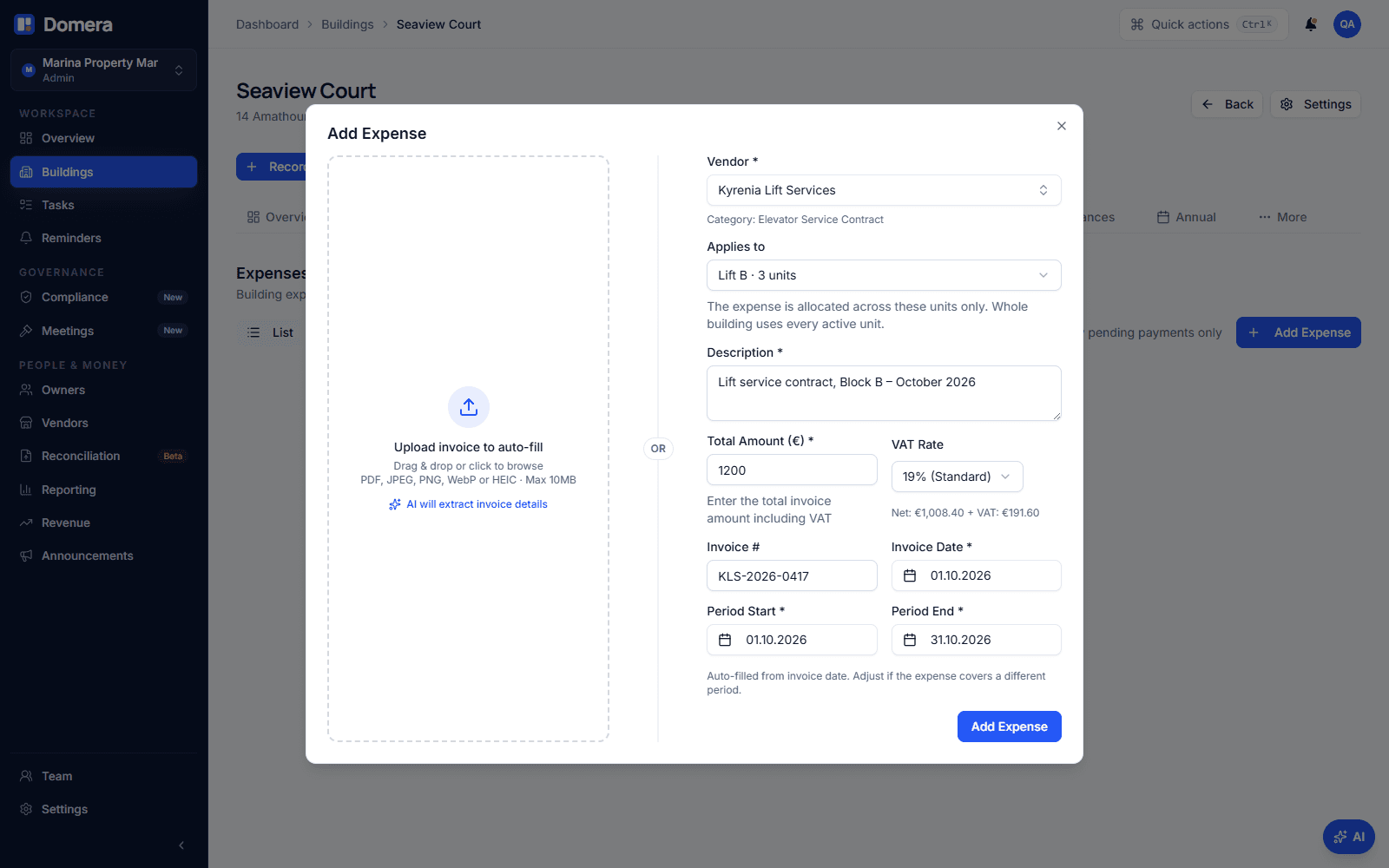
The Record expense dialog has an "Applies to" field once the building has at least one group: whole building, or one group. Pick the group and the expense is allocated across its units only. Nothing else about recording changes: the vendor, the category and the allocation method come from the same places, the document is attached the same way, and approval calculates the per-unit amounts at that moment. The same field is on recurring templates, so a monthly lift contract for Block B is scoped once and every generated expense carries it, and on expenses created from a bank line.
To stop people choosing by hand every time, give a group default categories. In this building, "Elevator service contract" defaults to Lift B, so a vendor in that category pre-selects Lift B in the dialog. The person recording can still override it for the odd invoice. A category can default to one group per building, and the defaults are per building: the same category can point to Block A's lift in one complex and to nothing in a building with a single block.
What do owners see?
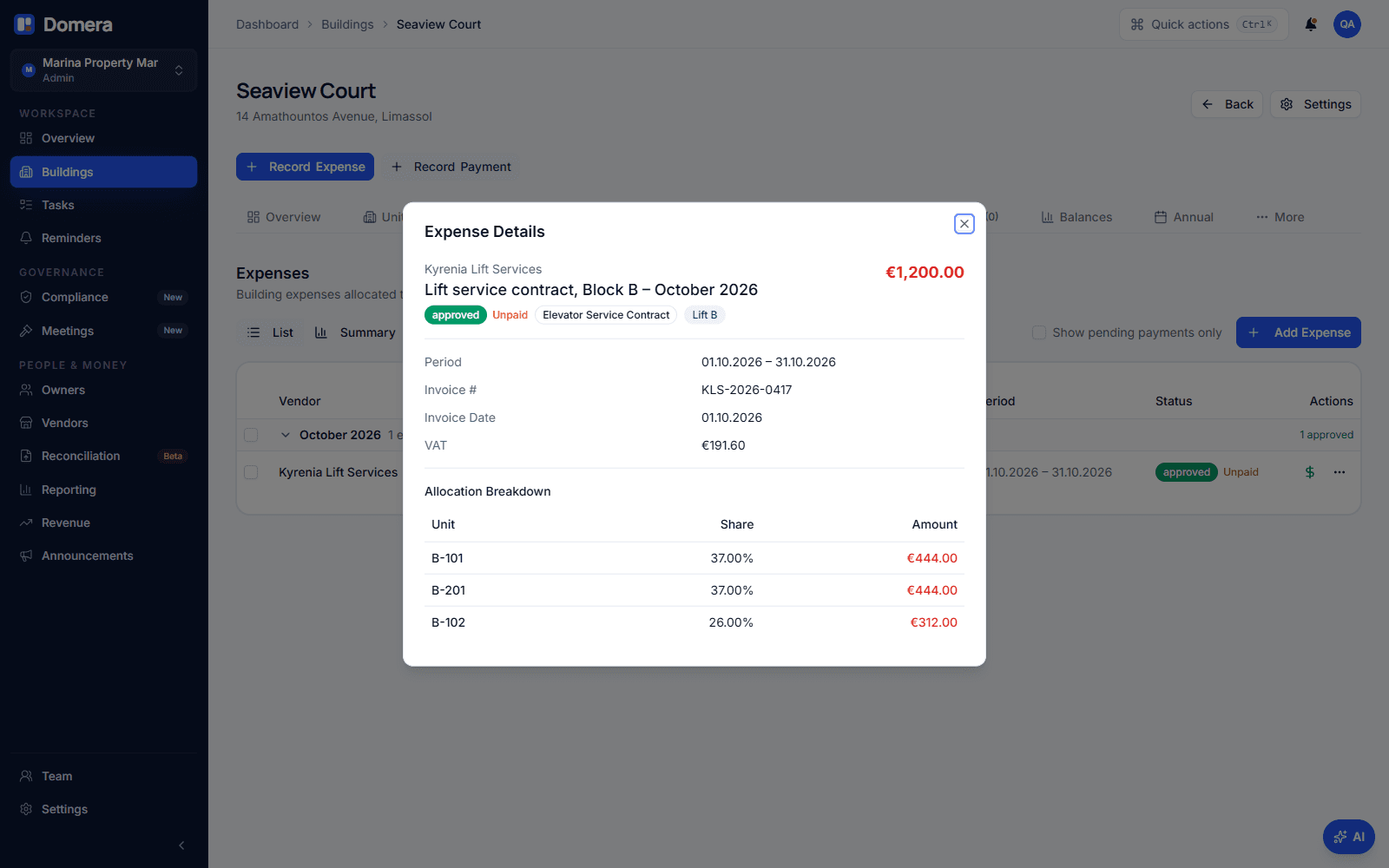
The owner statement does not change shape. A block-only charge appears as a line like any other, with the share the unit carried in that allocation. For a renormalised group that share is the unit's percentage of the block, so B2's lift line reads 25 %, not 12 %. The expense detail shows the group next to the category and lists only the units that were charged, which is the evidence a committee member asks for when an owner from Block A questions a lift bill.
The unit page and the owner portal show the unit's building share as before and, underneath it, each group the unit belongs to with its share inside that group. An owner can therefore check both figures against the deed. How to read your common expense statement explains the statement lines themselves.
What about budgets, levies and the AGM?
In budget levy mode the monthly levy is built from the approved budget, one line per category. A line whose category defaults to a group is levied across that group only, using the same shares as an expense would. The budget grid shows the group next to the category so the amount is read against the right set of units, and the AGM budget slide computes the per-unit impact with the same rule. For "Cleaning Block A €5,000 and Cleaning Block B €4,000", create a sub-category per block and point each at its block.
The reserve fund stays complex-wide, and so do quorum and votes at the general meeting, because the legal entity is the complex. Changing a group's members, shares or defaults re-allocates every approved but not yet billed expense and re-posts unbilled levies, exactly as changing a unit's share does. Charges already on a finalised statement are not touched: a unit cannot even be removed from a group that a locked expense was allocated by.
Checklist
- Set a complex up as one building, with the blocks as allocation groups, not one building per block.
- Check the deed: if it states block shares, enter them as the group's own shares; if not, leave the shares empty and let the building shares renormalise.
- Give each group the categories that belong to it, so block-only vendors pre-select the right scope.
- Use a block prefix in unit numbers, such as A-101 and B-101, because a unit number is unique within the building.
- For per-block budget lines, create a sub-category per block and point it at the block.
- After changing a group, check the expenses tab: approved, unbilled expenses are re-allocated and show the group badge.
Frequently asked questions
- Should each block be its own building in Domera?
- No. The complex is the legal entity, with one committee, one bank account, one AGM and one statement per owner. Set it up as one building and add the blocks as allocation groups. If blocks already exist as separate buildings, moving to one building later means re-keying units and starting from a period boundary with opening balances, so start new complexes the right way round.
- What happens if the group's shares do not add up to 100 %?
- Under 100 % is allowed and the allocation is renormalised across the members, so the whole bill is still allocated. Over 100 % is refused, because the engine would bill owners more than the invoice. A mix of typed and empty shares is refused too: either every unit in the group has its own share, or none has.
- Can a unit be in more than one group?
- Yes. A unit in Block B is usually also in the group for Block B's lift, and may be in a parking group as well. Each expense is allocated by exactly one scope, so the groups never compete; they are different answers to the question "who pays for this?".
- Can I delete a group, or take a unit out of it?
- A group that an expense or a recurring template points at cannot be deleted, because it is part of that expense's record; Domera tells you what uses it. A unit can leave a group as long as no finalised statement carries an allocation computed from that membership; approved but unbilled expenses are simply re-allocated at the new membership.
- Does this change how the statement is generated or how a payment is credited?
- No. Statements still bill each unit the allocations and levies not yet on a finalised statement, and payments are still credited the same way. A block-only expense is just an allocation that exists for some units and not for others.