Where does the split rule of an invoice come from?
When someone records an invoice in Domera, nobody picks a split rule on the invoice. The rule follows the vendor: the vendor belongs to an expense category, and the category carries a default allocation rule. Acme Cleaning sits in Cleaning Services, Cleaning Services is split by ownership share, so an Acme invoice is split by ownership share. The chain is short, it is the same for every person in the company, and it is why two people recording the same invoice get the same result.
Vendors, categories and rules are company-wide. That is right for a management company with forty buildings: one list of vendors, one set of categories for the annual accounts, one way of naming the rules. It is wrong the moment one building differs. In Cyprus the regulations of a jointly owned building may say that cleaning is shared equally per unit; a French règlement de copropriété may put the lift on a special key that one staircase does not pay; a building with no lift has no business paying lift maintenance by lift share. Until now the only ways round were a duplicate category ("Cleaning Services, Seaview Court") or remembering to correct each invoice by hand.
What is an allocation override?
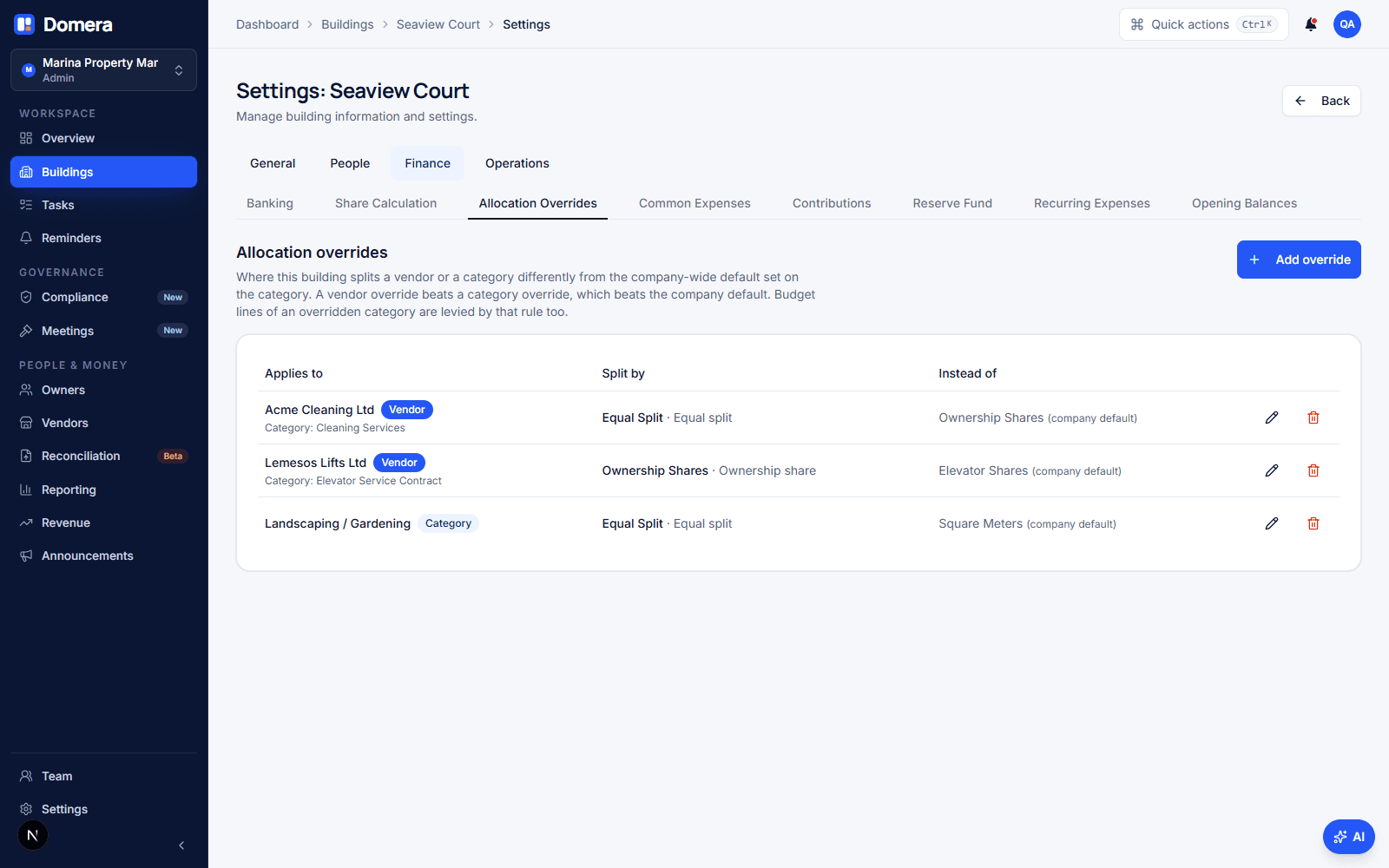
An allocation override is a row in the building's settings that says: in this building, this vendor (or this category) is split by this rule. It sits in front of the company-wide chain and changes nothing anywhere else. Seaview Court records "Acme Cleaning → Equal split"; the other thirty-nine buildings keep splitting Acme by ownership share, the category keeps its company default, and the accounts keep one category for cleaning.
The rows live under Settings › Finance › Allocation overrides. Their companion is Settings › Operations › Blocks & groups, and the two answer different questions. A group decides which units a cost lands on (the lift in Block B). An override decides how the amount is split across them (equally, by share, by floor area). An expense can use both: the lift contract in Block B, split by Block B's lift shares.
Only an admin can add or change an override, for the same reason only an admin can change a unit's share: the rule decides who pays how much. Every member of the company can see the rows, and the Record expense dialog tells a manager which rule applies and why.
Vendor, category or company: what wins?
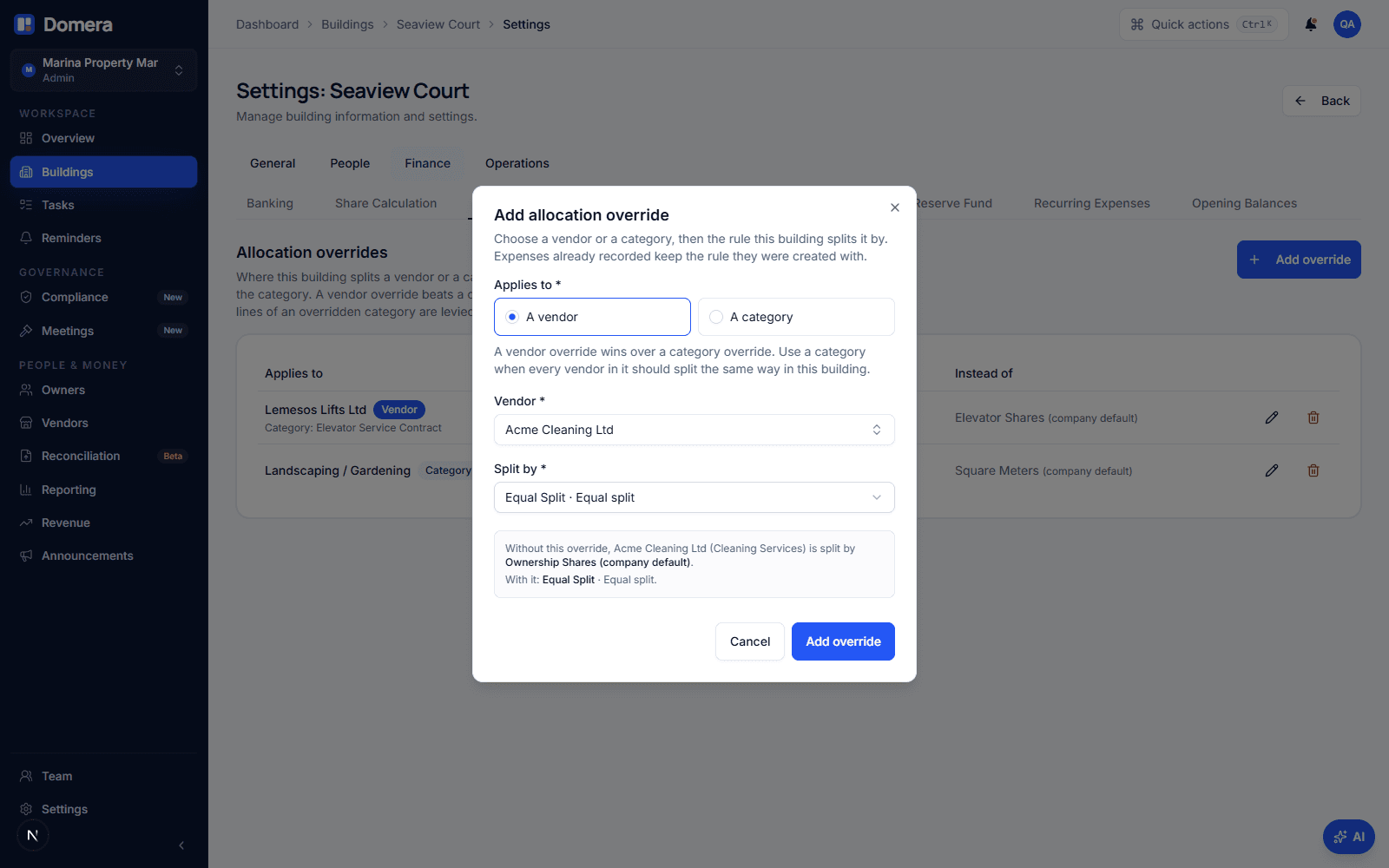
An override can be keyed by a vendor or by a category, and the order is fixed. A row for the vendor wins. If there is none, a row for the vendor's category applies. If there is none either, the company-wide default of the category applies, exactly as before. The dialog that adds a row shows what would apply without it, so an override is always read against the thing it overrides.
| Building | Rows in the building | Rule applied | Source |
|---|---|---|---|
| Seaview Court | Acme Cleaning → Equal split | Equal split | Building override for the vendor |
| Harbour View | Cleaning Services → Floor area | Floor area | Building override for the category |
| Olive Grove | none | Ownership share | Company default of Cleaning Services |
Use a category row when every vendor in that category should split the same way in the building: cleaning is shared equally here, whoever does the cleaning this year. Use a vendor row for the odd one out: the gardening contractor who also cleans the pool and is billed to the pool users by equal split, while the other gardeners stay on floor area.
What happens when I record an invoice?
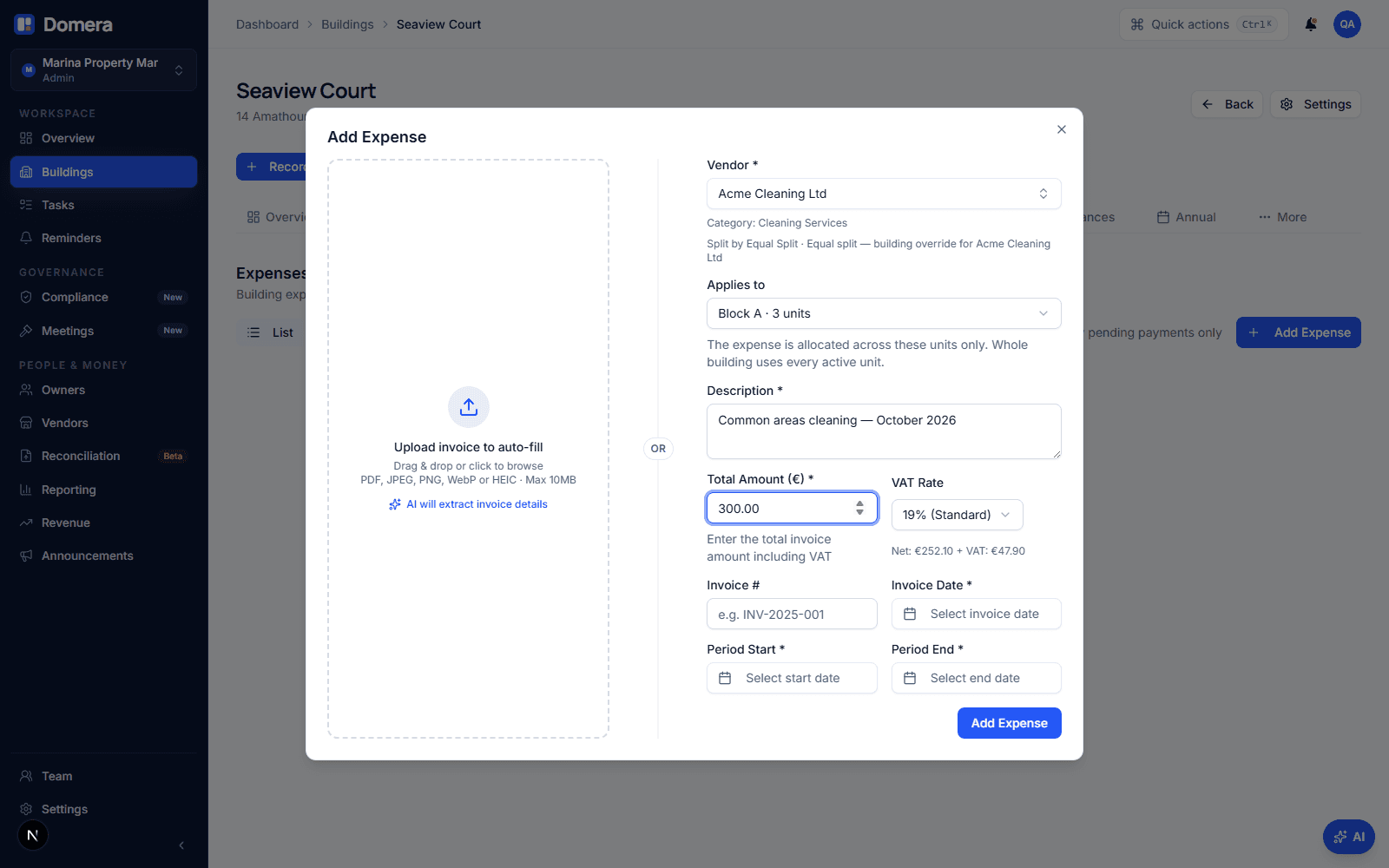
Nothing new to do. Choose the vendor as always; under it the dialog now says which rule the expense will be split by and where that rule came from: "Split by Equal split, building override for Acme Cleaning", or "Split by the company default for Cleaning Services" when the building has no row. The expense is saved with that rule, and approval calculates the per-unit amounts from it in the usual way: the sum of the unit amounts equals the invoice to the cent, and any rounding difference lands on the largest unit.
Recurring templates follow the same resolution when they are created, and so does an expense created from a bank statement line or through the assistant. One resolver is used everywhere, so there is no path through which the same vendor in the same building gets a different answer.
What about invoices already recorded, and budget levies?
The rule on an expense is fixed when the expense is created. Adding, changing or removing an override does not touch invoices already recorded, whether they are still drafts, approved, or on a statement. That is deliberate: an approved invoice must not change under the person who approved it because someone edited a setting a month later. To change the split of one existing invoice, edit the draft or revert the approval and record it again.
Budget levies are the exception, because they are a forecast, not a record. In budget levy mode the monthly levy is built from the approved budget, one line per category, each split by that category's rule. A building override for a category changes that rule, so the levy and the eventual actual invoice split the same way. When a category override is added, changed or removed, Domera re-posts the levies that are not yet on a finalised statement at the new method, exactly as it does when a unit's share changes. Levies already billed on a finalised statement stay as billed. The levy calculation report and the AGM budget slide use the same rule, so what the meeting approves is what gets levied.
The reserve fund is not affected: its levy has its own split setting on the building and never goes through a category.
What do owners see?
The owner statement does not change shape. Each charge line shows the amount and the share the unit carried in that allocation; for an equal split of a three-unit building that share reads 33.33 %, for ownership share it reads the deed percentage. An owner in a building with an equal cleaning split sees exactly that, and an owner in a building without a row sees the company default, which is what they always saw. How to read your common expense statement walks through the lines themselves.
What owners do not see is the setting. An override is a management decision recorded once; the evidence an owner needs is on the statement and in the expense detail, where the rule and the per-unit split are listed next to the invoice.
Checklist
- Read the building's regulations or deed before adding a row: an override should record a rule that exists on paper.
- Prefer a category row when the rule is about the kind of cost; use a vendor row only for the one vendor that differs.
- Check the Record expense hint on the next invoice: it should name the building override.
- In budget levy mode, check the levies not yet billed after adding a category row; they are re-posted at the new method.
- Do not expect existing invoices to change. Edit the draft or revert the approval if one must be re-split.
- Before deleting an allocation rule, look at which buildings use it in an override; Domera refuses the deletion and names them.
Frequently asked questions
- Can I set a different rule for one invoice only?
- Not from the Record expense dialog, which follows the vendor by design. An override is the right tool when the difference is about the building; a one-off difference is usually a sign that the invoice belongs to another category or vendor.
- What if the vendor's category also has a company default and the building has both a vendor row and a category row?
- The vendor row wins, then the category row, then the company default. The dialog that adds a row tells you what would apply without it, so you can see which rule you are overriding.
- Does an override change the units a cost is split across?
- No. That is what allocation groups do. An override only changes the method. The two work together: a lift contract scoped to Block B and split equally is a group plus an override.
- I changed an override and my approved invoices did not move. Is that a bug?
- No. The rule on an expense is fixed at creation, so that an approved amount never changes because of a later settings edit. Only budget levies not yet billed are re-posted, because they are a forecast rather than a record.
- Can I delete an allocation rule a building override uses?
- Not until the building override is removed or changed. Domera refuses the deletion and says how many building overrides use the rule, the same way it protects rules used by categories, expenses and recurring templates.