Is a repair caused by one flat a common expense?
Usually not. A common expense is a cost of the common parts, allocated to every owner by share. A cost that one unit caused, or that only one or two units benefit from, is a recharge: the building pays the contractor, and the owners responsible repay the building. The regulations of most jointly owned buildings in Europe allow the committee to recover such costs from the owner concerned; in Cyprus, for example, the building's regulations under Cap. 224 typically say so, and the committee's decision is what gives the recharge its footing. Where the regulations are silent, confirm with the competent authority or a lawyer before charging.
Three things make a recharge defensible. A decision: the committee minutes that the cost of invoice PL-2026-0931 is charged to A-105 and A-106 and why. Evidence: the plumber's report, photographs, the invoice with its line items. Transparency: the owners charged can see the full invoice, their share and the amount, and the other owners can see that the cost did not land on them. An owner can still dispute the decision, which is exactly why the paper trail matters.
Domera does not decide whether a cost is a recharge. It records the decision you made, allocates the invoice accordingly, and shows everyone what happened.
Three choices on one invoice
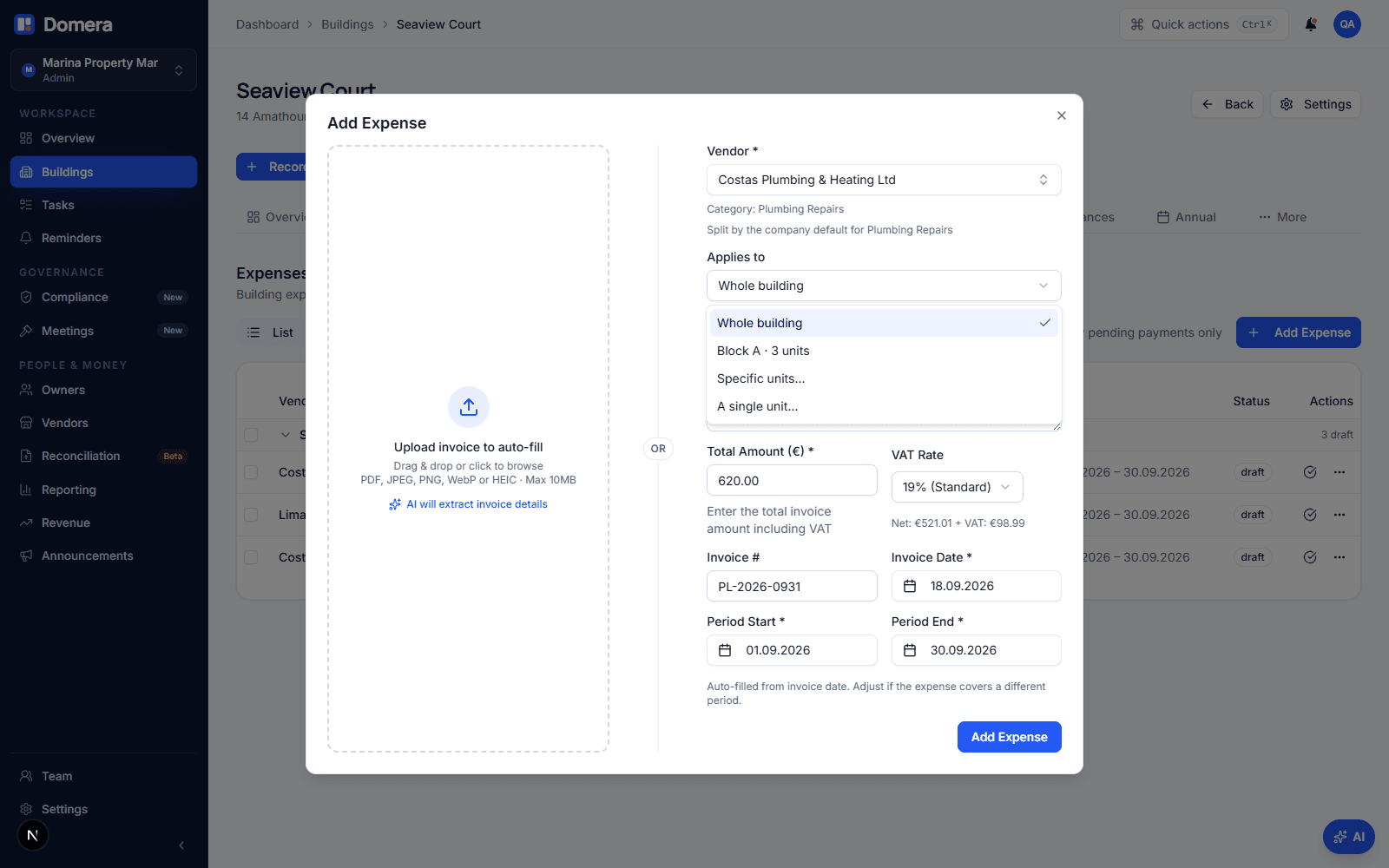
The Record expense dialog has an "Applies to" field. Until now it offered the whole building and, in a complex, the allocation groups for blocks, lifts or pools. It now offers two more entries, available in every building: "Specific units…" and "A single unit…". Pick one and a unit list opens inside the dialog, with each unit's number, its owners and its share of the building. Tick the units the invoice belongs to.
| Cost | Applies to | Who pays |
|---|---|---|
| Facade painting, insurance, gardening | Whole building | Every active unit, by the category's allocation rule |
| Lift service in Block B, stairwell cleaning Block A | A group (Block B, Lift B) | The group's units, by building share or the group's own shares |
| Burst riser pipe serving two flats, roof leak over three top-floor units | Specific units… | The ticked units, by the rule over them or by exact amounts |
| Lobby flooded by one flat's washing machine, forced entrance door | A single unit… | That unit, the whole invoice |
Nothing is saved for reuse. A group is the right tool for a set of units that keeps coming back, such as a block or the flats a lift serves; the manual choice is for this invoice only. The dialog says so under the field, so nobody builds a block out of one-off picks.
By the rule, or by exact amounts?
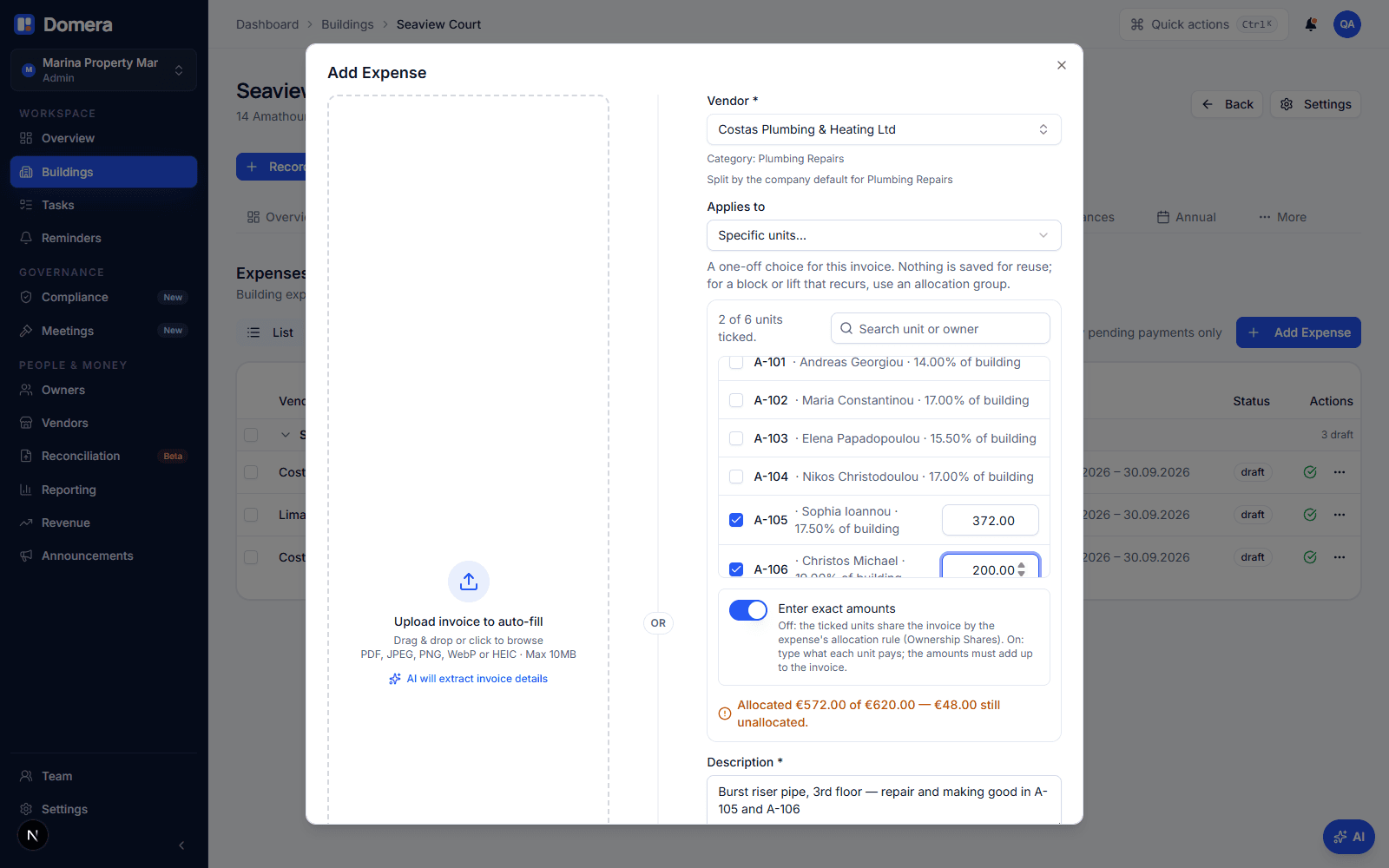
With several units ticked there are two ways to divide the invoice. Left alone, the expense's allocation rule applies to the ticked units only, renormalised over them. At Seaview Court, Plumbing Repairs allocates by ownership share; A-105 holds 17.5 % of the building and A-106 holds 19 %. Of a €620.00 invoice charged to the two of them, A-105 pays 17.5 ÷ 36.5 = 47.95 %, or €297.26, and A-106 pays €322.74. This is the right answer when the two units are equally responsible and the deed shares are the fair key between them.
Switch on "Enter exact amounts" when the invoice itself says who owes what. The plumber's invoice itemises €372.00 of work inside A-105 and €248.00 of making good in A-106, so those are the figures to type. Each ticked unit gets an amount box, and a running total underneath compares what you have allocated with the invoice total. While they differ, the difference is shown in orange: "€48.00 still unallocated" or "€48.00 too much". When they match, the line turns green. An amount of €0.00 is allowed for a unit that must appear on the invoice but owes nothing.
"A single unit…" is the same picker limited to one unit; the unit carries the whole invoice, so there is nothing to type. Either way, the choice is a property of this invoice. The category keeps its rule, the vendor keeps its category, and the next invoice from the same plumber starts from "Whole building" again.
How to record it, step by step
Record the invoice as usual: vendor, description, total including VAT, invoice number and date, the period it belongs to, and the document itself. Write the decision into the description, for example "Burst riser pipe, 3rd floor — repair and making good in A-105 and A-106, committee decision 24 September 2026". The description is what the owners read on their statement.
- Under Applies to, choose "Specific units…" or "A single unit…".
- Tick the units. Search by unit number or owner name if the building is large.
- Leave "Enter exact amounts" off to divide by the rule, or switch it on and type each unit's amount from the invoice.
- Check the running total reads "adds up", then save. The expense is a draft like any other.
- Approve it when the committee decision is minuted. Approval calculates the per-unit amounts and fixes them.
- Generate the month's statements; the charge appears on the statements of the units charged and on nobody else's.
The sum check and what you cannot do
Exact amounts must equal the invoice total to the cent. The dialog refuses to save while they do not, naming the difference. The server checks again when the expense is recorded, and the database checks a third time when the expense is approved, so no path, not even an import or a script, can approve an invoice whose unit amounts do not add up. A mix of typed and empty amounts is refused as well: either every ticked unit has an amount, or none has.
An expense is allocated to a group or to specific units, never both; the database refuses the combination. A unit from another building cannot be ticked, and a unit that stopped being active between recording and approval makes the approval fail with a readable reason rather than moving its amount elsewhere. Once approved, the chosen units are part of the expense's record and cannot change. To correct a draft, edit it; to correct an approved expense, revert it to draft first, as for any other change to an approved invoice. Expenses already on a finalised statement are locked and are never re-allocated.
Changing a unit's share later re-allocates approved but unbilled expenses, as it always has. A rule-based manual split is recomputed over the same units at the new shares; exact amounts are re-written as typed, because they came from the invoice, not from the shares.
What the owners see
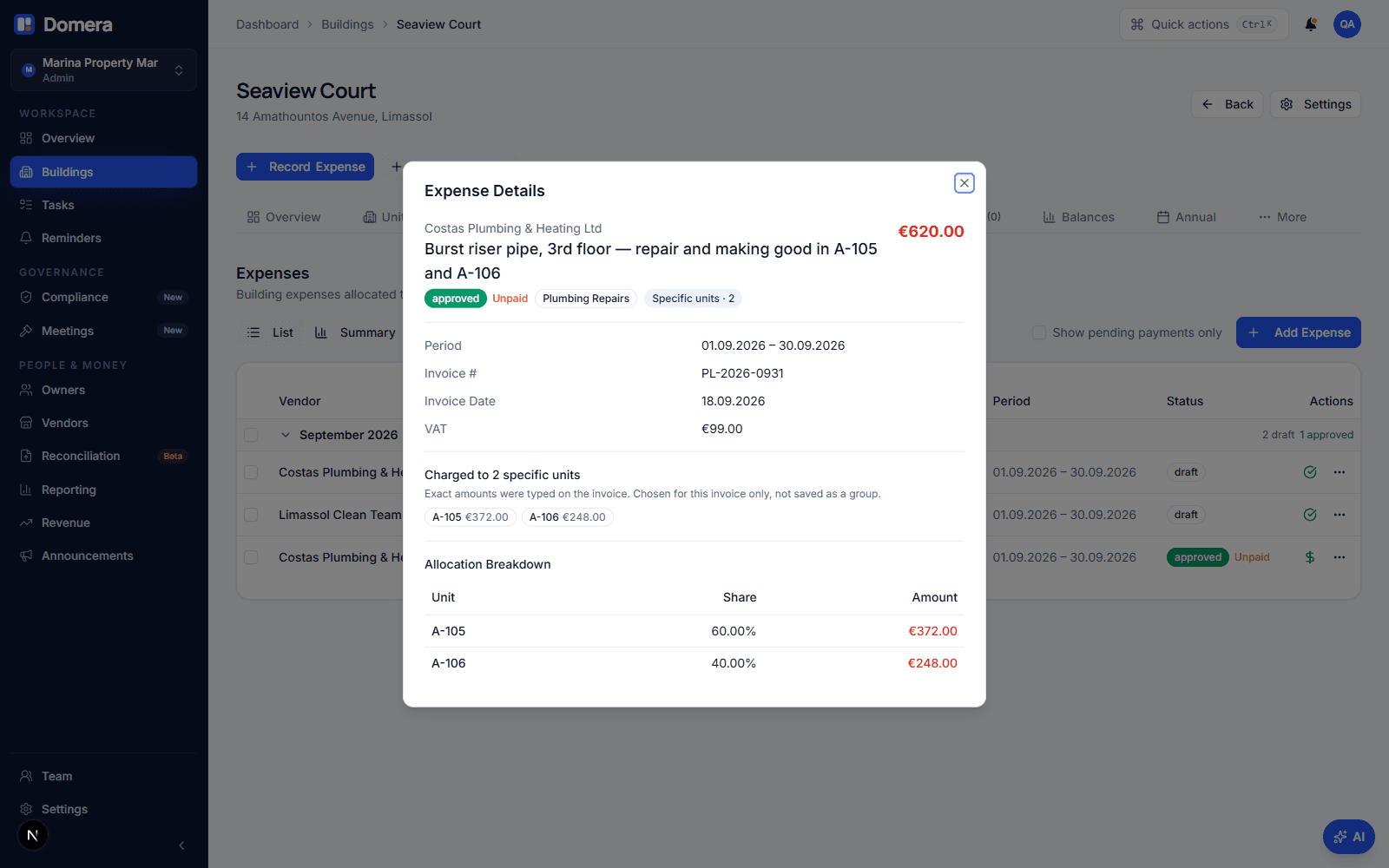
On the expenses list the invoice carries a badge: "Specific units · 2" or "Unit A-103". Expense details show the units charged, whether the amounts were typed or came from the rule, and after approval the allocation table with exactly those units. That table is the answer to the question every committee member gets: "Did my flat pay for the pipe on the third floor?" No, and here is the list.
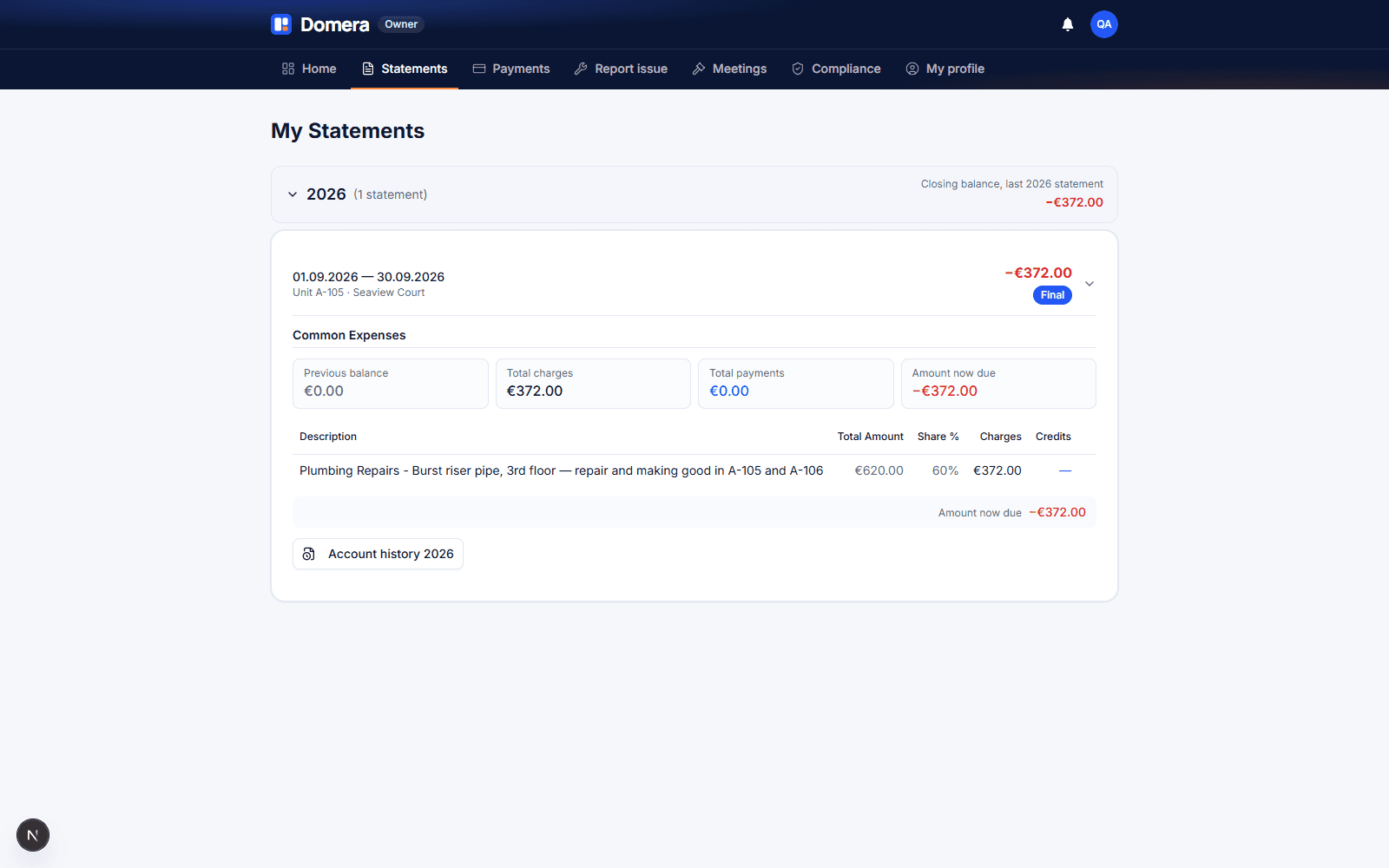
The owner statement does not change shape. The charge is a line like any other, with the invoice total, the unit's share and the amount allocated. The share printed is the unit's share of this invoice: A-105's line reads €620.00, 60 %, €372.00. For a single unit the share reads 100 %. Because the statement shows the whole invoice next to the owner's part, the owner can check the recharge against the plumber's invoice, which is the evidence a dispute turns on. How to read your common expense statement explains the other lines.
When a group is the better tool
If you find yourself ticking the same units invoice after invoice, the units are a block, a lift or a pool and deserve a name. Create an allocation group under Settings › Operations › Blocks & groups, give it the categories that belong to it, and the dialog pre-selects it. Groups can carry their own shares from the deed; a manual split cannot, because it is one invoice, not a structure of the building. Recurring templates offer groups and the whole building only, for the same reason: a recurring cost is by definition not a one-off recharge.
The manual split is for the invoice that will not come back. Record it, minute it, approve it, and let the statement do the explaining.
Checklist
- Decide, and minute, whether the cost is a recharge or a common expense before you approve it.
- Keep the evidence with the expense: attach the invoice, note the report and the decision in the description.
- Use exact amounts when the invoice itemises the work per unit; use the rule when the units are equally responsible.
- Watch the running total: save only when it reads "adds up".
- Approve after the decision, then generate the month's statements and check the charged units' lines.
- If the same units keep recurring, create an allocation group instead of ticking them each time.
Frequently asked questions
- Can I charge the whole invoice to one owner?
- Yes. Choose "A single unit…", tick the unit, and the whole invoice is allocated to it at 100 %. The owner sees the full invoice total and the amount on the next statement, and nobody else sees a line for it.
- What if the amounts I type do not add up to the invoice?
- The dialog shows the difference in orange and refuses to save until the amounts equal the invoice total to the cent. The database applies the same check when the expense is approved, so an invoice whose unit amounts do not add up cannot be approved by any route.
- Can I change the units after approval?
- Not directly. Revert the expense to draft, change the units or amounts, and approve again, as for any other correction to an approved invoice. An expense that is already on a finalised statement is locked and stays as it was billed.
- Does a manual split need the owner's agreement?
- Domera records the committee's decision; whether the owner must agree, or may dispute, depends on the building's regulations and national law. In Cyprus the regulations under Cap. 224 typically give the committee the power to recover such costs; in other countries the rules differ, so confirm with the competent authority. In every case keep the decision and the evidence with the expense.
- Is this the same as an allocation group?
- No. A group is a named, reusable set of units, such as a block, that can carry its own deed shares and default categories. A manual split is a choice for one invoice, with no shares of its own and nothing saved for later. An expense can have one or the other, never both.